> For the complete documentation index, see [llms.txt](https://docs.autommate.com/userguide/llms.txt). Markdown versions of documentation pages are available by appending `.md` to page URLs; this page is available as [Markdown](https://docs.autommate.com/userguide/service-automation/prepare-a-service-for-deployment.md).
# Prepare a service for deployment
Use Execute → Deployments to configure where a published service will run. In Enterprise, select the blueprint version and configure Scope, Engage, Govern, Execute, Prove and Review. In MSP, start from the ready service's Deploy action, select the target tenants and included Work Items, then configure the phases for those targets.
For the tenant-by-tenant procedure, use [MSP service deployment](/userguide/service-automation/deploy-a-service-to-msp-tenants.md).
#### Prepare the required pieces
| Item | What to establish before deployment |
| ------------------- | ----------------------------------------------------------------------------------------------------------------------------- |
| Service contract | The intended outcome and success criteria have been defined and the service is published. |
| Work items | The service uses the intended released versions. |
| Target environment | The intended environment and edition are known; identify the tenant separately where the supported MSP procedure requires it. |
| Inputs and bindings | Required work-item inputs and intended shared values have been identified. |
Publish the service before starting deployment. Enterprise does not require tenant selection; MSP configures deployments for selected tenants.
Deployment owner assignment is planned for a later version. Record the operational contact separately until that field is available.
## Example prepare the request intake package
Before deploying **Docs - Request intake service - 20261013**, write down the selections below. This short record connects the objects you built to the Case you will inspect later.
| Selection | What to record |
| --------------------- | ----------------------------------------------------------------------------------------------------- |
| Service | The request-intake service name and published version |
| Execute work | The request-summary Work Item and its released version |
| Prove work | Empty in the captured first exercise; a later real comparison requires a usable input/output contract |
| Mate Agent | The agent selected for this deployment |
| Environment | Development draft for the exercise |
| Expected local result | `REQ-DEMO-001 \| VPN access \| Maya Chen` |
Check that the service's published version contains the released item you intend to run. A newer Work Item release elsewhere in the product does not update this selection automatically.
When reviewing Execute bindings, distinguish a Work Item with no inputs from one with missing required inputs. A fixed-string example can intentionally have no inputs. If the Work Item is meant to return a summary to another step, inspect its actual output contract before continuing to the Prove binding.
The captured request-summary Work Item v1.0.0 exposes no inputs and noData output. For a subsequent version, mark variables as Use as Work Item Input to request deployment values, and assign the producing variable to the Stop body to provide an output to following Work Items. Save and release that Work Item, update the service pin, publish the service version and create its intended deployment package before checking the binding.
After saving or updating a package, reopen it and check the saved service version. Compare that version with the next Case's Context before investigating its actions.
The Default badge means the deployment inherits the blueprint's phase configuration. Review its Completion, Result and After Result values, including any choices customized in the blueprint.
#### Start the deployment wizard
1. Open **Execute → Deployments**.
2. Select **New deployment**.
3. Choose a published service.
4. Select the intended published blueprint version and continue to the draft-configuration steps. See the [Enterprise draft walkthrough](/userguide/service-automation/create-an-enterprise-service-deployment-draft.md) for the verified current flow.
If no service is selectable and **Continue** is disabled, return to **Services** and check whether the intended contract has been published. Creating a work item alone does not create a published service contract.
To adopt a later Work Item release, first create a new service version and explicitly update the pinned Work Item there, then deploy that new service version. See [Work Item version upgrades](/userguide/service-automation/create-work-items-and-pin-released-versions.md). A release in the Work Items list alone does not update an existing deployed service.
### Check three versions before diagnosing an upgrade
1\. Open the Work Item and note the released version you intend to use. A direct run checks that Work Item; it does not update an existing service.
2\. Open the published service version and inspect the Work Item version pinned in its phase. Record both numbers.
3\. Reopen the deployment package and check its saved service version. An existing draft remains its own package; selecting a newer service version does not replace it. Follow the new-draft route below before comparing run results.
4\. Invoke the intended development entry and open the matching Service Case. In Context, compare Version, Deployment and Environment with the reopened package.
5\. Inspect the Work Item within that Case and compare its release with the service’s pin. Investigate the first mismatch rather than assuming that the newest editor version ran.
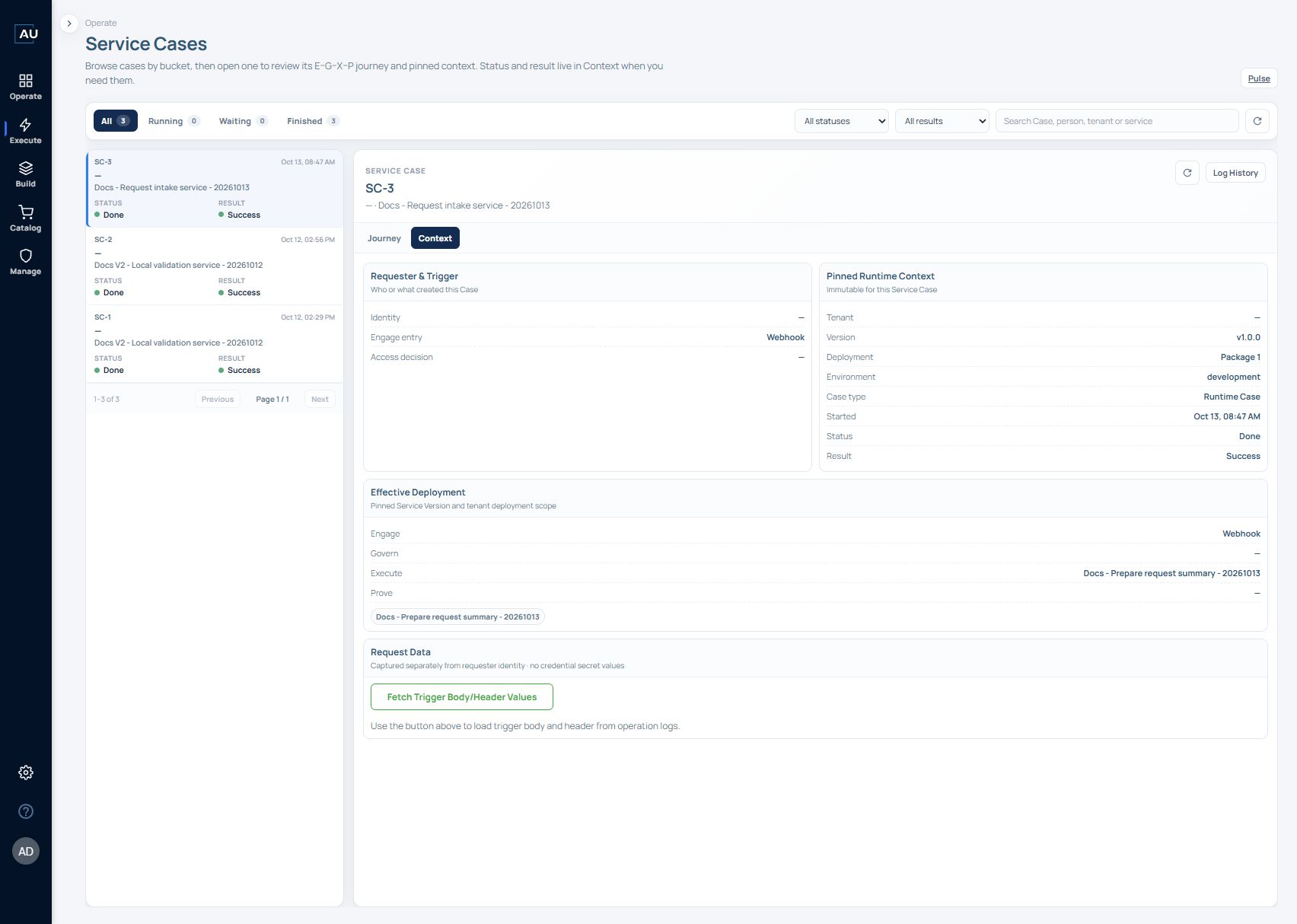
The recorded SC-3 example below ran service v1.0.0 / Work Item v1.0.0 in Package 1, development. Later service v1.1.0 configuration and a successful direct Work Item v1.0.1 run are separate records; the service v1.1.0 deployment was not verified.
Draft and live are separate packages. Selecting a newer service version does not replace an existing draft. To create a draft from a newer published service version, either remove the existing draft only when it is disposable and deletion is approved, or promote that existing draft only after it has passed the intended go-live checks. Then create a new draft from the required service version and recheck its package, bindings and pinned Work Items. Do not promote a draft merely to bypass an update question.
#### Find deployments later
The Deployments screen shows total, live, and draft counts. Use **All services** to focus on a service or **Drafts only** to find draft configurations.
Treat these as different checkpoints:
1. **Designed:** the service definition exists.
2. **Published:** a contract is available to deployment.
3. **Configured:** the draft package has its intended scope, Mate Agent, bindings, and phase settings; tenant selection depends on the supported edition-specific procedure.
4. **Executed:** a real service case has been created and its result inspected.
After running the draft, inspect its matching Service Case, including the pinned version and actual result. Use Pulse to review the relevant period and verification state. See [Service Cases](/userguide/operate-and-troubleshoot/read-service-case-status-and-result.md) and [Pulse](/userguide/operate-and-troubleshoot/understand-pulse-metrics.md).
#### Verified local deployment example
On 12 October 2026, a POST to the generated development URL returned HTTP 200 and `Flow triggered`. The corresponding **SC-2** record pinned **service v1.2.0, Package 1, development** and completed as **Done / Success**. Its journey recorded Engage **Done / Accepted**, Govern **Skipped**, Execute **Done / Delivered**, and Prove **Done / Verified**.
SC-2 shows the development entry and phase sequence. Its Prove Work Item assigns a fixed string. For a production service, replace that demonstration action with a check of the real success criterion. See [worked draft example](/userguide/service-automation/create-an-enterprise-service-deployment-draft.md).
### Compose one input from several values
When one input contains several selected variables, the result is a plain string. Select scalar values or nested keys. Combining a whole Object and a whole Data Table in one field is not a supported merge. For example: ##connected\_user\[user\_name]## has asked for an approval. approval id is ##approval\_id## and the external request id is ##ServiceNow\[request]\[id]##. Check the resolved input in a test run before using it to send an approval.
## Use this contract from an AI assistant
Preserve input types and pinned versions when using MCP. Resolve values from the task context, Engage, earlier Work Item outputs and permitted native lookups before asking for missing information. Keep tenant connections separate from reusable Service behavior. Follow [deployment input resolution](https://docs.autommate.com/userguide/mcp-and-ai-reference/deployment-input-resolution) and [structured service authoring](https://docs.autommate.com/userguide/mcp-and-ai-reference/structured-service-authoring); the current tool schema determines which operations your connection supports.