> For the complete documentation index, see [llms.txt](https://docs.autommate.com/userguide/llms.txt). Markdown versions of documentation pages are available by appending `.md` to page URLs; this page is available as [Markdown](https://docs.autommate.com/userguide/service-automation/create-an-enterprise-service-deployment-draft.md).
# Create an Enterprise service deployment draft
Select a published service, configure its phase bindings and create a Development draft for testing.
Create an Enterprise deployment package from a published service blueprint in Dublin 6.0.0. Select its work and Mate Agent, review bindings and phase settings, save a Development draft, then test it through its webhook and Service Case.
## Keep one example together
Use a single published service version through the configuration and execution steps. If you are following **Docs - Request intake service - 20261013**, select its released request-summary Work Item and inspect the linked action log for `REQ-DEMO-001 | VPN access | Maya Chen`. Record the actual service version and package displayed by your deployment; the initial wizard screenshots below use an earlier local lifecycle example.
| Before invoking the entry | What you should know |
| ------------------------- | -------------------------------------------------------------------------------------------------- |
| Target | Development draft, not an unrelated live package |
| Work | The intended Execute Work Item and released version |
| Data contract | Required inputs and actual exported output, if any |
| Runtime | The selected Mate Agent |
| Check | Which action-log value and Case fields establish the result; this Work Item has no exported output |
Do not add an input body merely because the sample request has a friendly identifier. Use the deployed input contract. A fixed-string Work Item can accept an empty body, while a parameterized Work Item needs its configured fields.
## Current request-intake development run
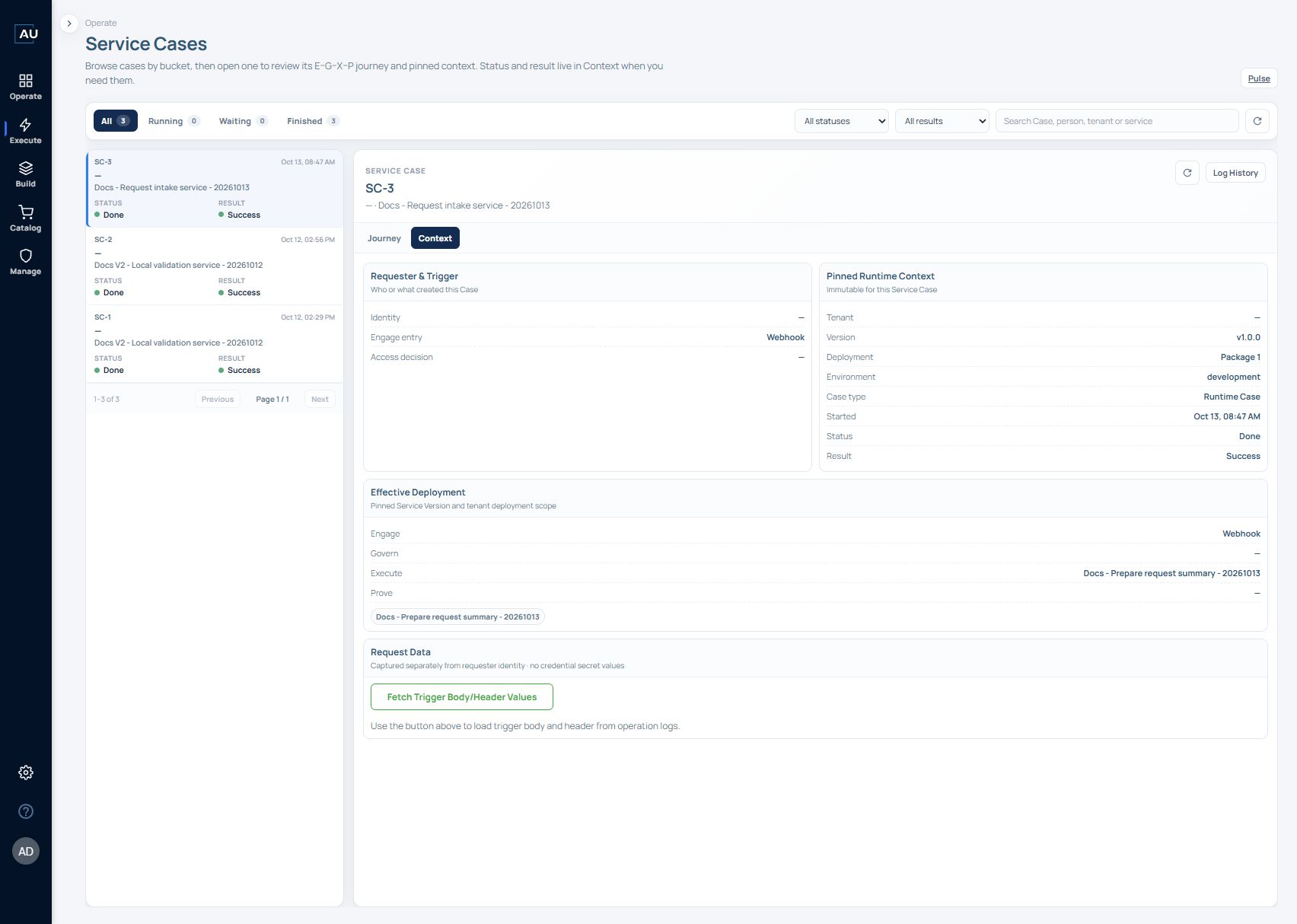
The 13 October request-intake run ties the new example objects together:
| Item | Observed configuration or result |
| ----------------------- | ---------------------------------------------------------------------- |
| Service | Docs - Request intake service - 20261013, v1.0.0 |
| Execute Work Item | Docs - Prepare request summary - 20261013, released v1.0.0 |
| Deployment | Package 1, Development draft |
| Work Item data contract | No input variables; no exported output; noData |
| Entry | POST to the generated development webhook; HTTP 200 and Flow triggered |
| Case | SC-3, Done / Success |
| Journey | Engage Accepted; Execute Delivered; Govern and Prove Skipped |
| Actual sample data | Stop & Return received REQ-DEMO-001 \| VPN access \| Maya Chen |
An HTTP acknowledgement, action input and Case result answer different questions. Inspect all three when checking the complete path. See the [Service Case walkthrough](/userguide/operate-and-troubleshoot/read-service-case-status-and-result.md) for the log-inspection steps.
The later **Work Item v1.0.1** was verified with a direct manual run, and **service v1.1.0** was configured with that newer Work Item. The existing Development Package 1 still showed **service v1.0.0** when reopened, so no v1.1.0 service run is claimed here. After changing a blueprint selection, reopen the saved package and inspect its version before sending a request; the Case's Context is the record of which version actually executed.
### Prepare the service
You need a published service version and its released Work Items. The example uses:
| Component | Configuration |
| ----------------- | ----------------------------------------------------------------------------------------------------- |
| Service blueprint | `Docs V2 - Local validation service - 20261012`, v1.0.0 |
| Engage | Webhook |
| Govern | No Work Items |
| Execute | One released Work Item, v1.0.0 |
| Prove | No Work Items |
| Work Item logic | Start → String Assign → Stop; assigns `docs-validation-ok` to the local string variable `docs_result` |
This recorded v1.0.0 demonstration uses local string assignment without an external application, notification, AI call or schedule, and its deployment reports noData. To expose an output in a new Work Item version, assign the producing variable to the Stop body and then update the service and deployment version.
### 1. Choose the blueprint version
Open the published service, select its **Deployments** view, and choose **New deployment**. Select the published **Blueprint version**; the example offers **v1.0.0 · Latest**.
Enterprise proceeds to Scope without tenant selection. Review shows Tenant: —. Labels such as “tenant package” do not change this Enterprise flow; use the MSP checklist for tenant-specific deployment.
### 2. Review Scope
**Scope** lists Engage, Govern, Execute, and Prove. Choose the work the package will run and inspect its order. The interface states that numbers follow the selected run order and parallel groups count as one step.
*Figure 1. The example selects one Webhook entry and one Execute Work Item. Empty Govern and Prove stages remain visible in the wizard.*
### 3. Select the Mate Agent in Engage
Select the package’s Mate Agent in Engage. The screenshot uses presales\_agent (Default) as an example. API and schedule execution share this selection, and the webhook URL is created after the draft exists.
Choose an agent that can reach the required systems and has the necessary dependencies. Verify its connection before testing the deployment.
### 4. Inspect Work Item bindings and phase behavior
Continue through **Govern** to **Execute**. Select the Work Item in the left panel to inspect its input and output contract.
The example explicitly displays:
* **Inputs:** “This work item has no input variables.”
* **Output:** “This work item does not provide an output.” The output type is **noData**.
Figure 2. This older v1.0.0 package reports noData. An internal variable alone is not a deployment output: assign that variable to the Work Item’s Stop body, release the Work Item and use it in the intended service version before inspecting the new package’s output binding.
Open Phase behavior and review Completion, Result priority, After Result and retry settings. These values are inherited from the blueprint until you override them. See [Configure phase behavior](/userguide/service-automation/configure-phase-behavior.md) for the available options.
### 5. Review and create the draft
Continue through **Prove** to **Review**. The example shows **Workspace: Development**, **Blueprint version: v1.0.0**, **Tenant package: Package 1**, and the selected Mate Agent. Check the work listed in each phase.
Choose **Create draft**. The interface describes this as an unpublished Development clone and states that it does not go live until **Go live** is confirmed. Saving the draft keeps its package number.
The deployment now has a draft card with its saved version and package. Update draft edits that draft’s configuration; it does not replace the package with a newly selected service version. Go live promotes the reviewed draft to production. Delete draft removes that draft and requires a deliberate cleanup decision.
### 6. Test the draft and inspect its Service Case
The configuration screenshots show an initial v1.0.0 draft. The execution example below uses v1.2.0 with a Prove Work Item. These are demonstration versions, not required values for your deployment.
1. Check the target version and package. If an earlier draft exists, follow the separate-package procedure below before creating a new draft from the required published service version. Confirm the Development environment before invoking it.
2. Send POST to the product-generated webhook URL, preserving its \&dev flag and using the service’s required input body. The no-input demonstration used {} and returned HTTP 200 with {"status":true,"message":"Flow triggered"}. Keep the generated URL and credentials private.
3. Locate the matching Service Case by service and request time. Open Context and Journey, and verify the version, package, environment, Status and Result. In this demonstration, SC-2 shows v1.2.0, Package 1, development and Done / Success.
Example result: Engage is Done / Accepted, Govern is Skipped, Execute is Done / Delivered and Prove is Done / Verified. The test prove Work Item is Done / Pass. Why this result/state? explains that all-positive at priority 1 matched before any-positive and selected end-success.
Demonstration limit: test prove assigns the constant test to string\_variable. It exercises Prove without checking Execute’s business result. Replace it with a real success-criterion check for production. The USD 1 outcome value shown is synthetic test data, not revenue or ARR.
### Troubleshooting: correlate timestamps
Operational screens display timestamps in the browser’s time zone. The Mate Agent’s Time Zone setting does not change those browser-local timestamps.
Record the time zone when comparing a request, execution log and Service Case. For example, 11:56 UTC and 14:56 Türkiye time refer to the same instant.
Align the time zones before widening a search window or treating a Case as missing.
### Create a new draft from a newer service version
Draft and live are separate packages. Selecting a newer service version does not replace an existing draft. To create a draft from a newer published service version, either remove the existing draft only when it is disposable and deletion is approved, or promote that existing draft only after it has passed the intended go-live checks. Then create a new draft from the required service version and recheck its package, bindings and pinned Work Items. Do not promote a draft merely to bypass an update question.
After creating the new draft, reopen it and confirm the published service version, Work Item pins, Mate Agent and binding values. Keep the earlier recorded Case tied to the package and version that actually ran; a new draft does not change historical Case context.