> For the complete documentation index, see [llms.txt](https://docs.autommate.com/userguide/llms.txt). Markdown versions of documentation pages are available by appending `.md` to page URLs; this page is available as [Markdown](https://docs.autommate.com/userguide/service-automation/configure-entry-points-and-service-flow.md).
# Configure entry points and service flow
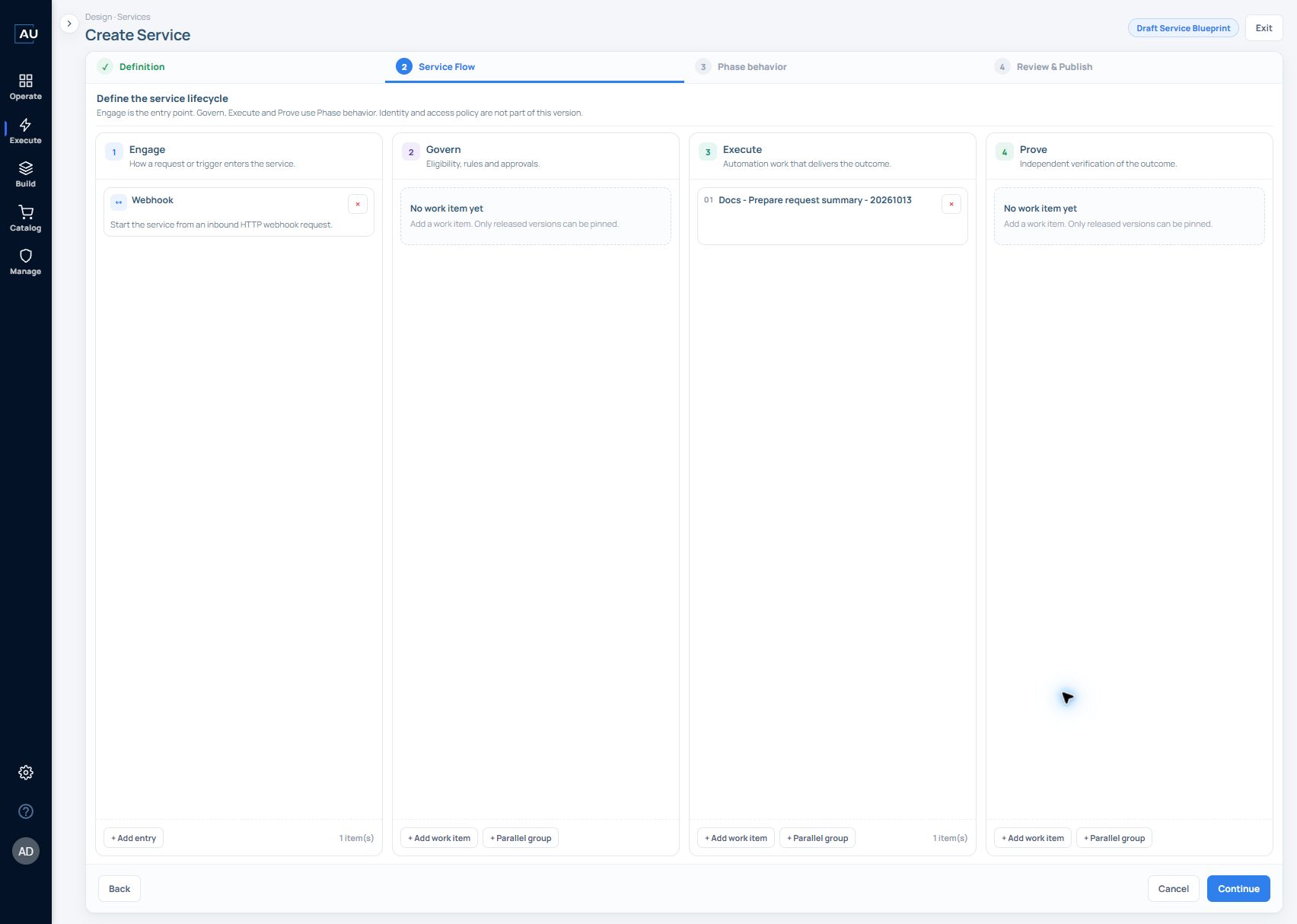
The **Service Flow** step connects the service definition to the work that will deliver it. Engage receives the request; Govern, Execute, and Prove organize the work.
## Add an Engage entry
1. In **Create Service**, finish **Definition** and select **Continue**.
2. In **Engage**, select **+ Add entry**.
3. Choose the entry type for the service. The designer describes **API** and **Schedule** entry types, each of which can be added once.
4. Review the entry card. The API entry is displayed as **Webhook**, described as starting the service from an inbound HTTP webhook request.
The Webhook card includes Remove entry. After publishing the service and configuring a deployment, use that deployment's generated URL to invoke the entry.
## Add phase work
Each of the following phases provides **+ Add work item** and **+ Parallel group**:
| Phase | Place this kind of work here |
| ----------- | ------------------------------------------ |
| **Govern** | Eligibility checks, rules, and approvals. |
| **Execute** | Automation work that delivers the outcome. |
| **Prove** | Independent verification of the outcome. |
Select **+ Add work item** within the appropriate phase, find the work item, and choose a released version. The designer pins that released version when it is added. See [Work items and version pinning](/userguide/service-automation/create-work-items-and-pin-released-versions.md).
## Example compose the request intake service
Use **Docs - Request intake service - 20261013** from [Define a service](/userguide/service-automation/define-a-service.md) and the released request-summary Work Item from [Work Items](/userguide/service-automation/create-work-items-and-pin-released-versions.md).
| Phase | First exercise | Result to inspect |
| ------- | ---------------------------------------------------- | -------------------------------------------------------------------------------------- |
| Engage | Add the API entry displayed as Webhook | The deployed development entry accepts the intended request |
| Govern | Leave empty for this local text-preparation exercise | The Case records that no Govern work was selected |
| Execute | Add the released request-summary Work Item | Inspect the String Assign action log for `REQ-DEMO-001 \| VPN access \| Maya Chen` |
| Prove | Leave empty for this first lifecycle exercise | The inspected v1.0.0 contract is noData; this exercise makes no exported-output claim. |
1. Add the Webhook entry in Engage.
2. In Execute, choose **+ Add work item**, search for **Docs - Prepare request summary - 20261013** and select its released **v1.0.1** version for the positive example.
3. Check the version displayed on the added item. Saving new canvas changes later will not silently replace this pin.
4. Leave Prove empty for the captured first exercise. A future comparison needs an actual exported output or a separate observable result; a local String variable and API response body do not provide that binding.
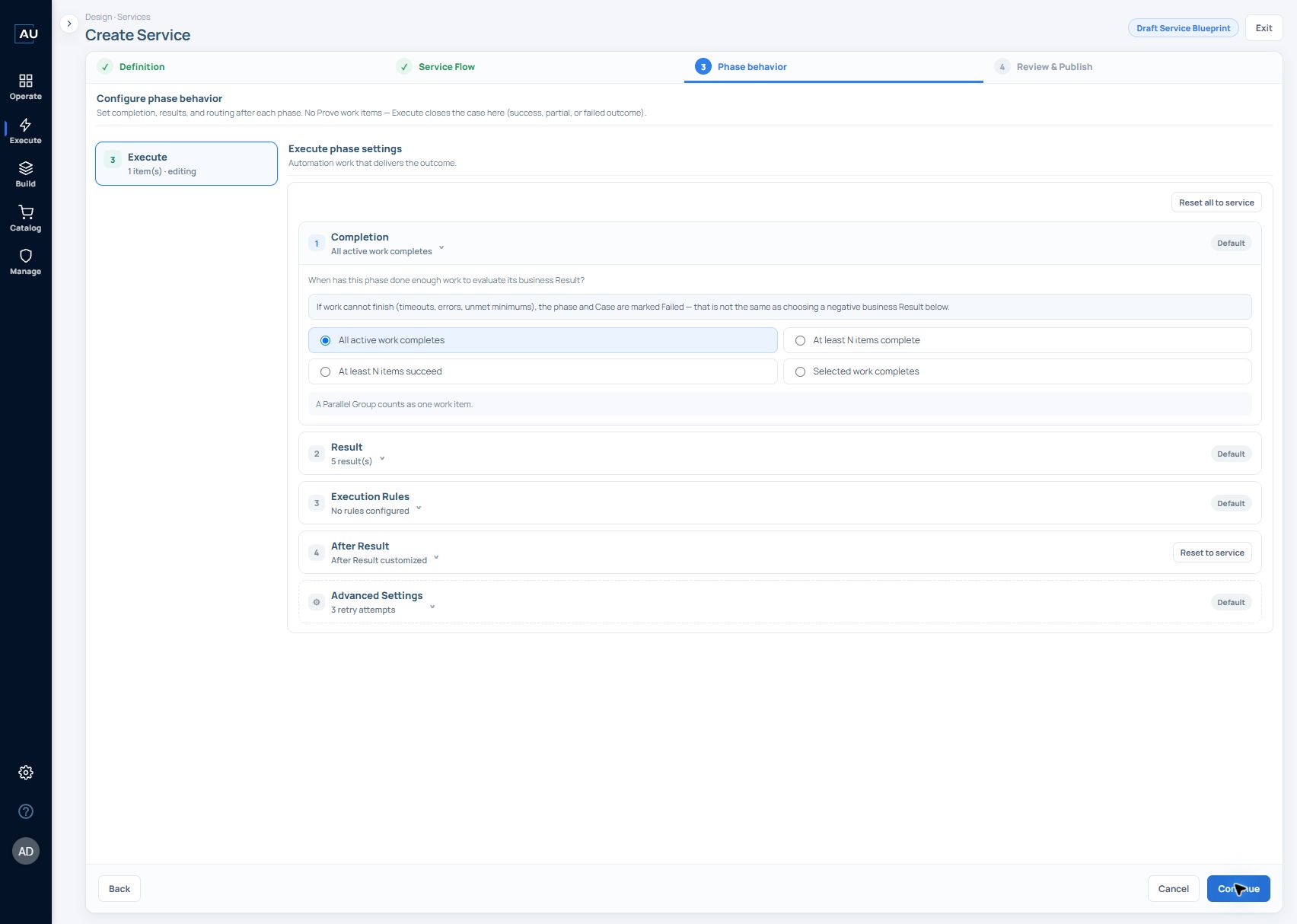
5. Continue to Phase behavior and review the Completion, Result priority and After Result selections before publishing the service version.
{% code collapsedlinecount="10" %}
```mermaid
flowchart LR
A[Webhook request] --> B[Prepare request summary]
B --> C[Inspect actual summary]
C -. when configured .-> D[Prove compares the summary]
```
{% endcode %}
The dotted step is an optional extension: export the summary, bind it to a Prove Work Item and compare it with the expected request values.
The request-intake v1.1.0 review below contains an action-log success criterion, one Webhook entry, one Execute Work Item, no Govern or Prove work, and zero demonstration value. This is the service configuration; the recorded SC-3 run used service v1.0.0 and Work Item v1.0.0.
## Resolve an empty Execute phase
If **Continue** reports **“Execute needs at least one work item”**, add an Execute work item with a released version. An Engage entry alone does not satisfy this requirement. A Govern work item does not replace the required Execute work.
If the picker is empty, clear restrictive application filters, check the selected origin, and verify that the required work item has a released version. The list offers **Refresh** and **Create new work item**.
## Keep the first design small
Start with one entry and one checkable outcome. Add approval or human-task waiting only where the service needs it. Place every action that follows Pause for resume inside its After Resume group; actions below the pause on the normal Work Item path will not run after the continuation.
For the token payload and a small waiting example, see [Work Items](/userguide/service-automation/create-work-items-and-pin-released-versions.md).
The current wizard exposes **Phase behavior** after Service Flow. Configure this separately from the content of the work item. The current Service Flow screen explicitly excludes identity and access policy from this version.
Configure Completion, Result priority and After Result before publishing. In an Execute-only service, Execute closes the Case. Add a Prove Work Item when the service must independently check its business outcome. See [Configure phase behavior](/userguide/service-automation/configure-phase-behavior.md).
## Current behavior — Dublin 6.0.0
Service webhook entries accept **POST**. In the generated URL, `&dev` selects the development/draft version; without that flag, the request targets live/production. Opening the URL in a browser sends GET and is not a supported service-trigger test. Preserve the flag when testing draft and use the body and authentication for the selected deployment.
Select earlier Work Item outputs explicitly when binding the step after a parallel group. Prove work is required for a verified outcome; an empty Prove phase leaves the outcome unverified. A Prove Work Item that only assigns a constant demonstrates execution of that phase, not verification of Execute's business result.
## Compose through MCP
The UI walkthrough above records its stated product version. The MCP declarations reviewed on 21 October 2026 additionally describe Engage entry values `webhook`, `schedule`, `email`, `saas` and `ai_agent`. A declared entry type does not prove every UI or execution path is implemented in your build. In particular, verify the native event-to-Service route before selecting `saas`; the reviewed `services_run` operation supports live webhook deployments only.
Use [native discovery](https://docs.autommate.com/userguide/mcp-and-ai-reference/native-app-trigger-and-data-discovery) to locate an existing event and [structured service authoring](https://docs.autommate.com/userguide/mcp-and-ai-reference/structured-service-authoring) to compose real Govern, Execute and Prove behavior. A phase label or constant success value is not a substitute for eligibility checks or destination verification.