> For the complete documentation index, see [llms.txt](https://docs.autommate.com/userguide/llms.txt). Markdown versions of documentation pages are available by appending `.md` to page URLs; this page is available as [Markdown](https://docs.autommate.com/userguide/operate-and-troubleshoot/understand-pulse-metrics.md).
# Understand Pulse metrics
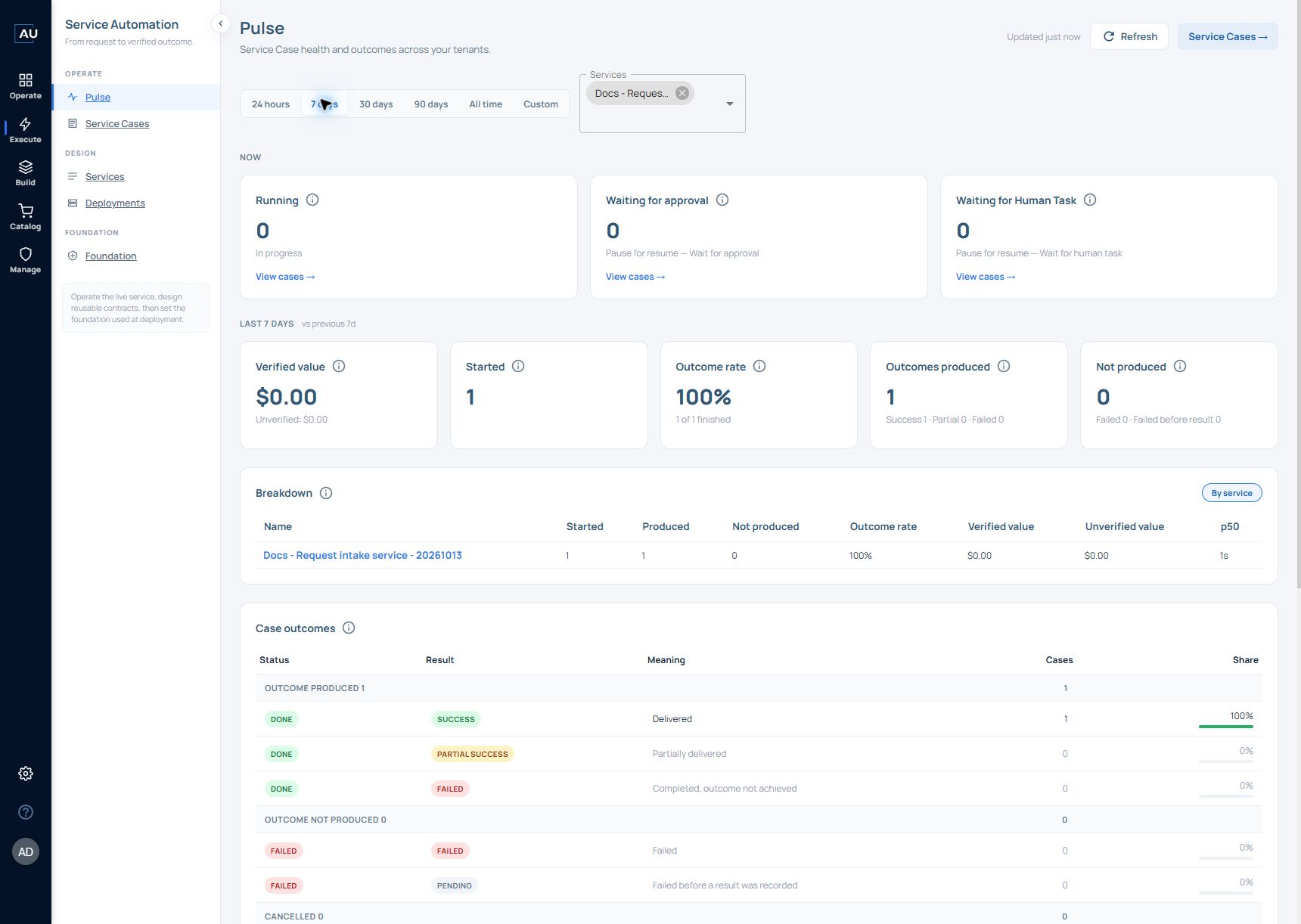
Open **Execute → Pulse** to review service-case health and outcomes. Pulse combines live counts with period-based measures; the two must be interpreted separately.
## Set the context
Choose **24 hours**, **7 days**, **30 days**, **90 days**, **All time**, or **Custom**. Use the **Services** selector to focus on a service and **Refresh** to update the view. The captured Enterprise interface provides a service filter and **By service** breakdown; the metric help text also describes tenant filtering and tenant breakdown where available.
## Live counts: the Now section
| Metric | Definition in the product |
| -------------------------- | ------------------------------------------------------------------------------------------------------------------- |
| **Running** | Live count of cases in Running status. Not affected by the selected period; uses tenant and service filters. |
| **Waiting for approval** | Cases waiting for approval through **Pause for resume → Wait for: approval**. Not affected by the selected period. |
| **Waiting for Human Task** | Cases waiting for a human task through **Pause for resume → Wait for: human**. Not affected by the selected period. |
Changing the reporting period is not expected to change these live counts. Use each card's **View cases** link to inspect the underlying cases.
## Period measures
| Metric | Definition in the product |
| --------------------- | ------------------------------------------------------------------------------------------------------------------------------------------------ |
| **Started** | Cases that started in the selected period. |
| **Outcomes produced** | Cases that finished in the period with **Done** status and a result of **Success**, **Partial success**, or **Failed**. |
| **Not produced** | Cases that ended in the period with **Failed** status; includes failures before a result was recorded. |
| **Outcome rate** | Outcomes produced ÷ (outcomes produced + not produced) in the period. Cancelled cases are excluded. |
| **Verified value** | Value of verified outcomes finished in the period. Unverified value, where Prove was skipped or missing, is shown separately and is never added. |
**Outcome rate is not a success rate.** The definition of Outcomes produced includes **Done + Failed**, which means the case completed but its outcome was not achieved. Use the Success, Partial, and Failed breakdown when assessing actual delivery.
The value shown is a configured service-outcome measure. Do not substitute it for billed revenue, collected cash, or ARR.
## Compare the right cohorts
**Outcomes produced**, **Not produced**, and **Verified value** use cases that **finished or ended** in the selected period. A case can be counted here even if it started earlier.
**Case outcomes** groups cases that **started** in the selected period into outcome produced, not produced, cancelled, or still in progress. Row shares are percentages of that started cohort. **Phase funnel** uses this started cohort too.
For example, a case started yesterday and completed today belongs to today's finished-case measures but not today's started-case cohort. A difference between these sections is not, by itself, a reporting error.
## Example reconcile a service with its Cases
After running the request-intake exercise, choose that service in **Services** and choose a period containing the request time. Select **Refresh**, then use **View cases** or the corresponding outcome count to open the underlying records.
1. Confirm the selected service name and reporting period before reading any total.
2. Open the Cases represented by the count. Match the service, Case identifiers and start/end times.
3. Read Status and Result for each Case, then check its Prove state when interpreting verified value.
4. Return to Pulse and compare only measures that use the same cohort.
The following two fictional records explain why counts can differ without an error:
| Case | Started | Finished | Where it belongs in today's view |
| --------- | --------- | ------------- | ----------------------------------------------------------------------- |
| Example A | Yesterday | Today | Today's finished-case measures; not today's started cohort |
| Example B | Today | Still running | Today's started cohort and current running work; not a finished outcome |
The figures above illustrate the date rule; they are not screenshots of a measured result. When checking your service, use its actual Case timestamps. A short run can complete before you see it in the live Running card, so a zero Running count does not mean that the service never ran.
For a tutorial with a configured outcome value of zero, a zero verified-value total is expected even if a Prove step passes. For a nonzero sample value, identify it as a configured demonstration value; it does not measure billed revenue or ARR.
### Worked example: reconcile one produced outcome
On 13 October 2026, Pulse was filtered to Docs - Request intake service - 20261013 and 7 days. It showed Started 1, Outcomes produced 1, Not produced 0 and Outcome rate 100% (1 of 1 finished). Verified value and Unverified value were both $0.00. The three Now cards were zero.
1\. Open Execute → Pulse. Select 7 days and select only Docs - Request intake service - 20261013 in Services. Select Refresh.
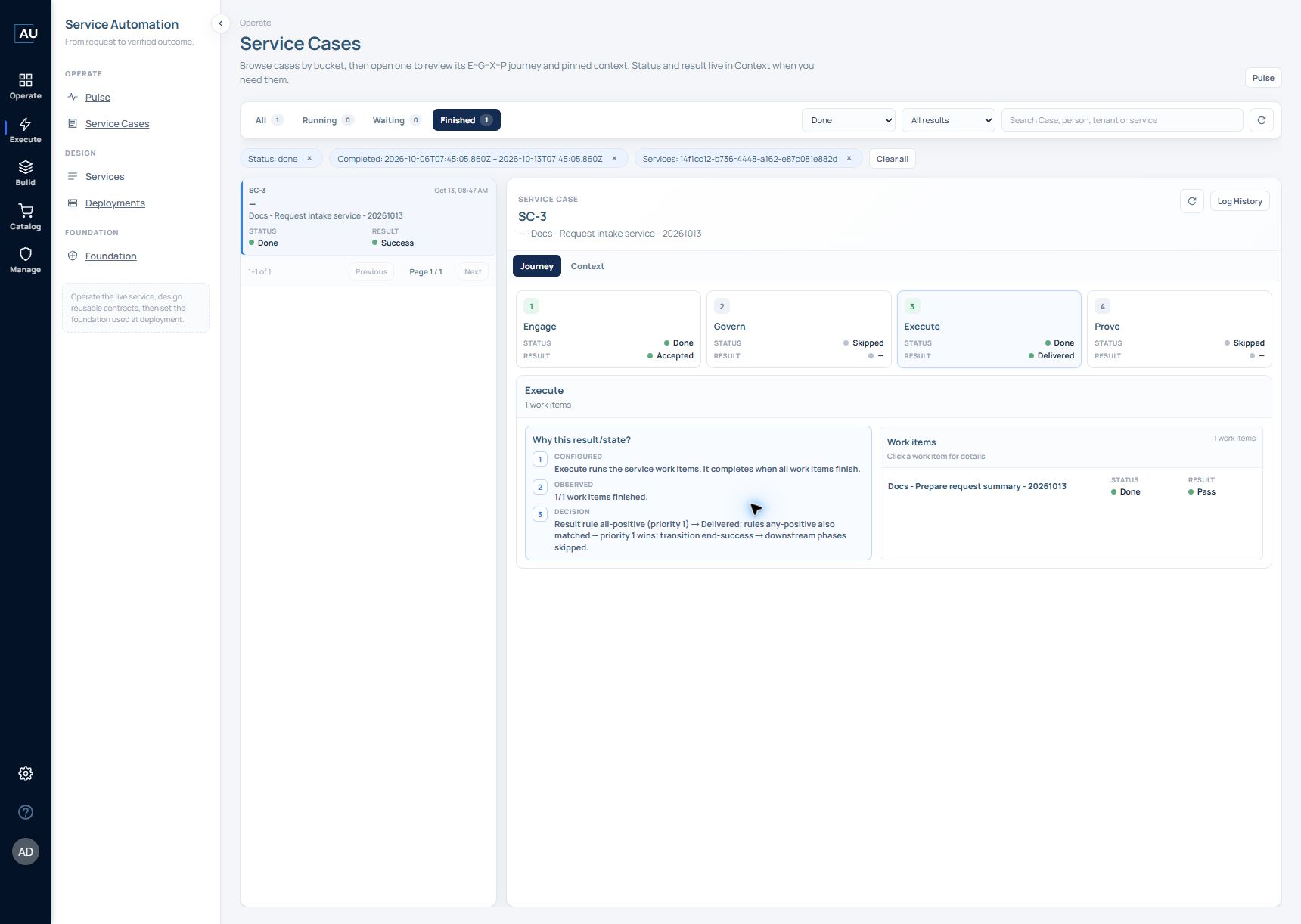
2\. Read Outcomes produced, then open its underlying Case count. In the captured example, the resulting view retained service ID 14f1cc12-b736-4448-a162-e87c081e882d and the Completed period 2026-10-06T07:45:05.860Z to 2026-10-13T07:45:05.860Z. These are UTC filter values; use the period generated by your own view when repeating the exercise.
3\. Confirm Finished 1 and the single SC-3 row. It shows Done / Success. The Pulse count of 1 therefore matches one finished Case for this same service and period.
4\. Open SC-3 and read Journey. Engage is Done / Accepted and Execute is Done / Delivered; Govern and Prove are Skipped. Open Context to confirm service v1.0.0, Package 1 and development.
5\. Use the count match to validate navigation and reporting scope. Inspect the Work Item logs separately before treating the Case result as proof that the intended business change occurred.
The filtered Case view contains exactly SC-3. This is the matching record for the selected produced-outcome count.
This example verifies count-to-Case reconciliation, not a verified business outcome. Prove was skipped, and the recorded Stop & Return input was result=false while the Case showed Success. Keep that action input and Case result distinct when diagnosing the run. The later direct Work Item v1.0.1 success does not establish that service v1.1.0 ran.
If a Custom range does not produce usable results, check that both dates remain populated after leaving their fields. For this exercise, the 7 days preset produced the recorded view. Preserve the selected filters and exact error text when reporting a range problem.
## Use the supporting views
* **Breakdown:** aggregates started, produced, not produced, outcome rate, and verified/unverified value by service or tenant, where available.
* **Phase funnel:** shows Engage, Govern, Execute, and Prove statuses for the started cohort. The legend includes Done, Failed, Skipped, Waiting, Running, and Not started. A skipped Prove means the outcome was not verified.
* **Top failure reasons:** groups frequent failure messages by phase, work item, and message for the period.
When summarizing Pulse for another person or AI agent, include the period, filters, cohort, status/result distinction, and whether value is verified.