> For the complete documentation index, see [llms.txt](https://docs.autommate.com/userguide/llms.txt). Markdown versions of documentation pages are available by appending `.md` to page URLs; this page is available as [Markdown](https://docs.autommate.com/userguide/operate-and-troubleshoot/troubleshoot-service-setup.md).
# Troubleshoot service setup
Find the symptom below and check the prerequisite for that step. Build and release the Work Item, publish the service, configure a deployment, then inspect the Case created by its trigger.
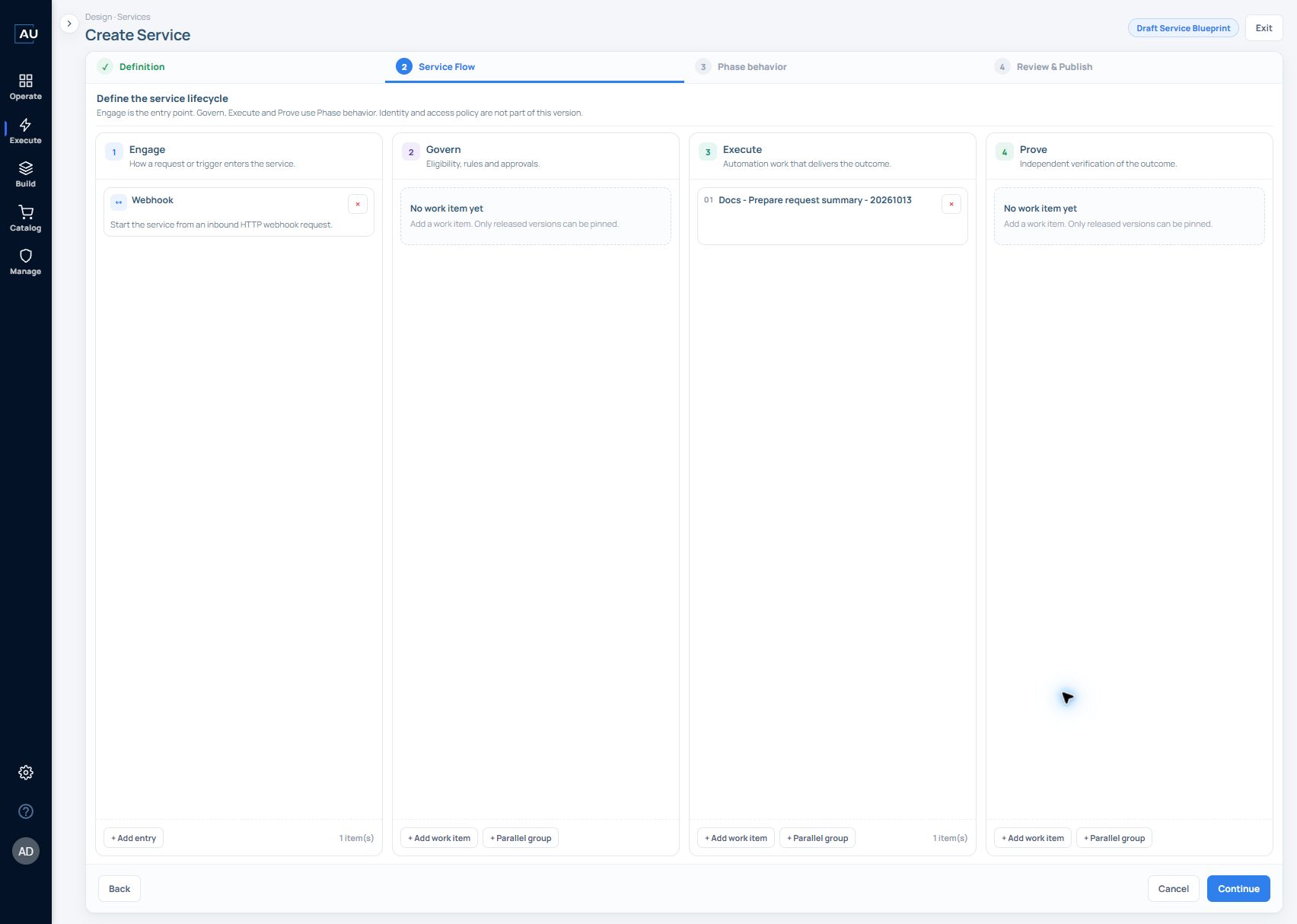
### “Execute needs at least one work item”
This validation appears when continuing from **Service Flow** without Execute work.
Add an appropriate work item to the **Execute** phase and select a released version. An Engage entry, such as Webhook, does not satisfy this requirement. Work in Govern does not substitute for Execute work either.
A configured Execute phase contains at least one selected Work Item. In this request-intake example, Engage has the Webhook entry and Execute contains the released request-summary item.
See [Configure entry points and service flow](/userguide/service-automation/configure-entry-points-and-service-flow.md).
### “No work items match this filter”
In **Add work item**, check these in order:
1. Clear or shorten the search text.
2. Review **Origin**: **All**, **My Work Items**, or **Market catalog**.
3. Remove restrictive **Applications** filters. Every selected app must match the item.
4. Check whether the intended work item has a released version, rather than only a Dev version.
5. Select **Refresh**.
The empty picker below is the Govern variant. Read the phase in the dialog title before creating or selecting an item; the same search and release checks apply to the intended phase.
If no suitable item exists, select Create new work item and release the required phase-specific work. Check release status as well as the displayed version number.
See [Create work items and pin released versions](/userguide/service-automation/create-work-items-and-pin-released-versions.md).
### No service is selectable for deployment
**New deployment** starts by choosing a **published service contract**. If the list is empty and Continue is unavailable, return to **Services** and check that the intended service has been published.
Publish the intended service contract before returning to New deployment.
See [Prepare a service for deployment](/userguide/service-automation/prepare-a-service-for-deployment.md).
### No Service Cases appear
Clear the case search, Status, and Result filters, then check the **All** bucket. Confirm that you are looking at the intended environment and tenant and use **Refresh case list**.
If the Case is still missing, check whether the service trigger was invoked successfully and targeted the expected draft or live package.
When investigating a reported execution, collect its service/deployment name, approximate time and time zone, initiating request or trigger, and any returned case identifier. Use those facts to locate the corresponding record rather than assuming the latest case belongs to the request.
See [Service Cases](/userguide/operate-and-troubleshoot/read-service-case-status-and-result.md) and [Pulse metrics](/userguide/operate-and-troubleshoot/understand-pulse-metrics.md).
### A browser GET returns INVALID-QUERY-PARAMETER for a service webhook
Service webhook triggers accept POST. Opening the generated URL in a browser sends GET and can return INVALID-QUERY-PARAMETER. Use the intended deployment’s URL, authentication and request body. See the [Enterprise draft example](/userguide/service-automation/create-an-enterprise-service-deployment-draft.md).
The URL's `&dev` flag selects the development/draft version. Without it, the request targets live/production. Keep the flag when testing draft; do not remove it as an error workaround. Keep secret-bearing URLs out of escalations.
Expected result: POST acknowledges the trigger, then a matching Service Case records execution. An acknowledgement may not contain a Case identifier; correlate by service, request time and deployment context. Check the Case’s Status, Result and Prove condition before reporting the business outcome.
### Worked investigation: the Case and the action tell different parts of the story
SC-3 is a recorded development run of service v1.0.0 and Work Item v1.0.0. The Case finished Done / Success; it is not a captured failed Case.
1\. Open Context and confirm the service version, Package 1 and development environment before comparing the run with a newer editor version.
2\. In Journey, select Execute and read Why this result/state? The recorded decision applied the first matching all-positive rule, producing Delivered and the configured end-success transition.
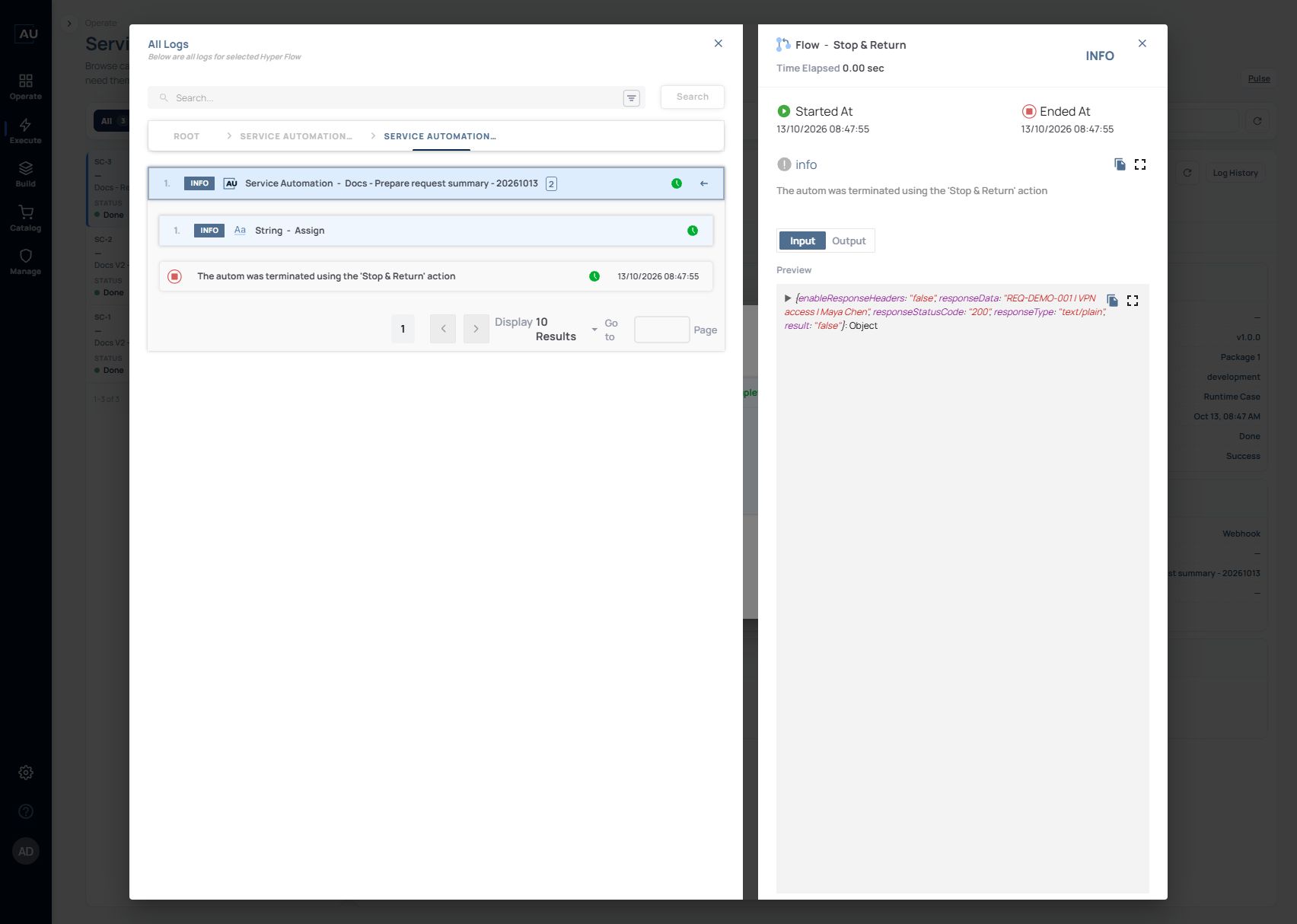
3\. Open Log History → View All Logs. Expand Execute Phase and the Work Item, then open the Stop & Return information and select Fetch Input Output.
4\. Inspect the actual input. In this run it contains result=false, responseStatusCode=200, responseType=text/plain and the exact responseData REQ-DEMO-001 | VPN access | Maya Chen.
5\. Keep the HTTP acknowledgement, action input, Work Item result and Case outcome separate. The configured HTTP 200 is not a technical error. For a negative business result, check the supported Work Item/Prove result contract rather than assuming that an HTTP response or result field alone changes the Case outcome. That negative-result mapping remains under clarification for SC-3.
This older v1.0.0 deployment reports noData and skips Prove. To provide a value to following Work Items, assign the producing variable to the Stop body, release it and update the service/deployment package. A direct successful v1.0.1 run does not verify a new service package or a downstream consumer.
### The resume caller returns an invalid or already-used token error
Send the resume request to the same service with this body: { "serviceResumeToken": "\", "serviceResumeDecision": "approve", "serviceResumeComment": "Approved by team lead" }. Use the token generated for the waiting action; it is created after every child in Before Wait completes.
A token accepts one continuation. An invalid token or a token already used returns an error to the caller. Inspect the caller response and the matching Service Case before retrying. A caller-side error is not proof that a new Work Item action ran.
### Actions below Pause for resume did not run
After the approval or human task ends, only the After Resume group runs. The Work Item does not continue through the normal workflow below or outside Pause for resume. Move the required follow-on actions into After Resume, release the corrected Work Item and update the service to that released version.
In a test Case, inspect the child actions in Before Wait, send the continuation once, then inspect the child actions in After Resume. Do not treat a missing normal-path action below the pause as a successful continuation.
See the payload and placement example in [Work Items](/userguide/service-automation/create-work-items-and-pin-released-versions.md).
### Clean up a service that has a schedule
Deleting a service also deletes its associated scheduling system workflow and stops that schedule. Existing Service Case logs are retained.
This cleanup applies to service deletion. Before disabling a deployment or deleting a draft, confirm how that action affects its schedule. Do not delete a shared service to stop a single test invocation.
### Information to include in an escalation
Send **** the product version, environment, affected service/work item, exact validation message, expected next step, and a screenshot of the relevant screen. Include identifiers and the run time when available; omit passwords and connection secrets.
### A newer service version does not replace an existing draft
Draft and live are separate packages. Selecting a newer service version does not replace an existing draft. To create a draft from a newer published service version, either remove the existing draft only when it is disposable and deletion is approved, or promote that existing draft only after it has passed the intended go-live checks. Then create a new draft from the required service version and recheck its package, bindings and pinned Work Items. Do not promote a draft merely to bypass an update question.
### A waiting action does not expire automatically
Pause for resume has no automatic expiry in Dublin 6.0.0 as of 13 October 2026. Do not design a timeout or escalation around an assumed token expiry. Treat the single-use resume token and any separate cancellation or escalation process independently.