> For the complete documentation index, see [llms.txt](https://docs.autommate.com/userguide/llms.txt). Markdown versions of documentation pages are available by appending `.md` to page URLs; this page is available as [Markdown](https://docs.autommate.com/userguide/operate-and-troubleshoot/manage-execution-queues.md).

# Manage execution queues

Use queue pools to group Hyperflows for sequential execution. A queue pool concerns flow execution; it is different from a Parallel Group inside a service.

### Before you start

* Use an account permitted to manage queues.
* Identify the Hyperflows that should belong to the pool.
* Check current executions before changing membership.
* Choose small, controlled test runs to validate the intended order.

### Create a pool

1. Open **Queue** and select **Add Queue Pool**.
2. Enter a unique pool name and a description.
3. Select **Next**.
4. Search for and select the Hyperflows to include. The selector lists flows available for assignment.
5. Review the selection and select **Add Pool**.
6. Reopen the pool and confirm the membership.

Some screens use the label **Autom** for a Hyperflow. In the pool list, the flow count, created timestamp, and updated timestamp help identify the configuration.

### Verify execution

1. Trigger the intended controlled test flows through their normal entry points.
2. Open execution monitoring and inspect Pending, In Progress, and History as appropriate.
3. Compare start/end times and execution IDs with the order your process requires.
4. Confirm the downstream result before relying on the pool for business operations.

Adding a flow to a pool is a configuration change; it is not evidence that the flow has run successfully.

### Edit or remove a pool

* To edit, select **Edit**, update the name, description, or membership, and select **Save**.
* Reopen the pool and check the saved membership before the next production run.
* To remove a pool, first assess current and scheduled executions, then select **Delete** and confirm the intended pool.

Do not infer that deleting a pool cancels already-running work. Check execution state separately.

### Expected result

The saved pool contains the intended Hyperflows and controlled executions follow the required sequential behavior.

### Troubleshoot

* Flow missing from the selector: check whether it is already assigned to another pool and whether your account can access it.
* Work remains pending: inspect the running item, runtime availability, and action errors before resubmitting.
* Unexpected order: compare actual executions and triggers; avoid inferring order from the visual order of a list.
* Duplicate work: review the original execution before triggering it again.

### Related reference

* [Monitor executions and retain useful evidence](/userguide/operate-and-troubleshoot/monitor-executions-and-retain-useful-evidence.md)

### Worked example: check two test flows in one queue pool

Create two isolated Hyperflows, Docs queue A and Docs queue B, that do not call external systems. In A, use the installed Time Management → Delay action for a bounded test delay, followed by a simple text result. The documented delay unit is milliseconds: 10000 represents ten seconds. In B, return a different fixed text result without a delay. Confirm the unit in the current action before running.

1\. Create a queue pool named Docs sequential demo and add only these two test flows. Save, reopen it and confirm both memberships.

2\. Trigger A once. Find its execution in In Progress and record its identifier. Then trigger B once while A is still running.

3\. Inspect Pending and In Progress, then wait for both records to appear in History. Retain each trigger time, start, finish, status and returned text.

4\. Check whether B started only after A finished. The expected sequential behavior is no overlap between these two executions in the pool. The pool’s row order alone does not prove scheduling order.

5\. If B starts after A has already finished, the run confirms completion but does not demonstrate the waiting behavior. Repeat only the isolated test with a suitable bounded delay; do not lengthen operational flows merely to create a screenshot.

Keep the pool configuration and both run records together. If either run fails, diagnose that failure before concluding that the queue ordering is wrong. After the exercise, confirm that no work remains active before removing the isolated test pool.

### Configure the isolated documentation pool

The current Queue wizard separates DETAILS from ADD HYPER FLOW. Use a test pool so you can inspect membership without changing existing operational pools.

1\. Select Add Queue Pool, enter a distinct name such as Docs - queue exercise and a description, then continue to ADD HYPER FLOW.

<figure><img src="https://3857940684-files.gitbook.io/~/files/v0/b/gitbook-x-prod.appspot.com/o/spaces%2FJcSHU5jP5GABQrGmWvW2%2Fuploads%2FnXjESUOWt6j0FMQUi3VB%2Fqueue-details.jpg?alt=media" alt="Name the isolated queue pool before selecting its members."><figcaption><p>Name the isolated queue pool before selecting its members.</p></figcaption></figure>

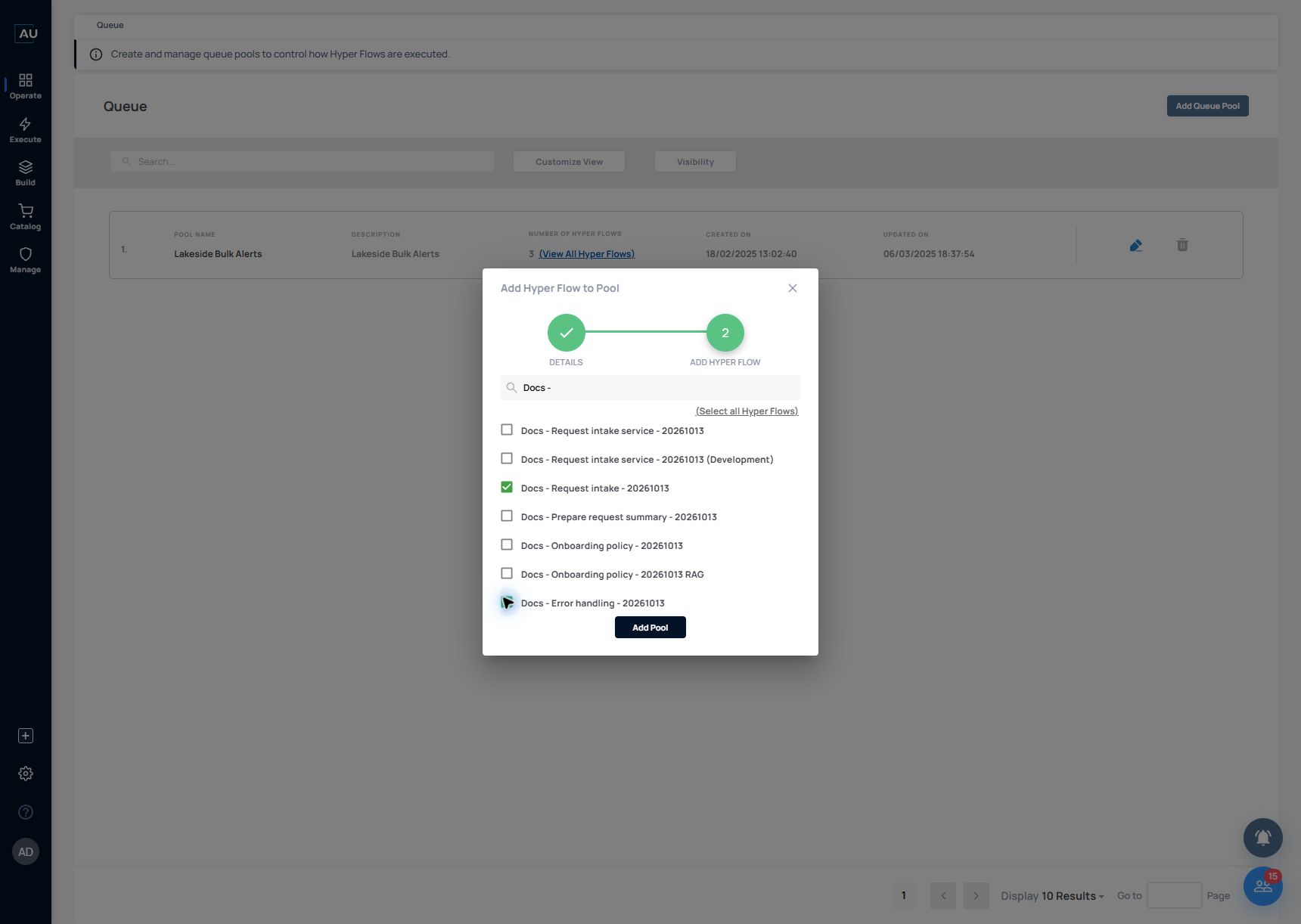
2\. Search for Docs -. Select only Docs - Request intake - 20261013 and Docs - Error handling - 20261013 for this isolated configuration exercise. The similarly named service, Work Item and agent/RAG entries are different objects; do not use Select all Hyper Flows.

<figure><img src="https://3857940684-files.gitbook.io/~/files/v0/b/gitbook-x-prod.appspot.com/o/spaces%2FJcSHU5jP5GABQrGmWvW2%2Fuploads%2FNE9sRUH09SmYGkpDezBz%2Fqueue-members.jpg?alt=media" alt="Select the two exact local test Hyperflows; leave the service and agent entries unselected."><figcaption><p>Select the two exact local test Hyperflows; leave the service and agent entries unselected.</p></figcaption></figure>

3\. Review the two checked names before Add Pool. Reopen the saved pool and use its member list to confirm the intended selection.

4\. Membership is configuration evidence only. To test waiting/sequential behavior, run a bounded A/B exercise like the one above and compare both actual start/end times. The membership screenshot does not prove overlap prevention.

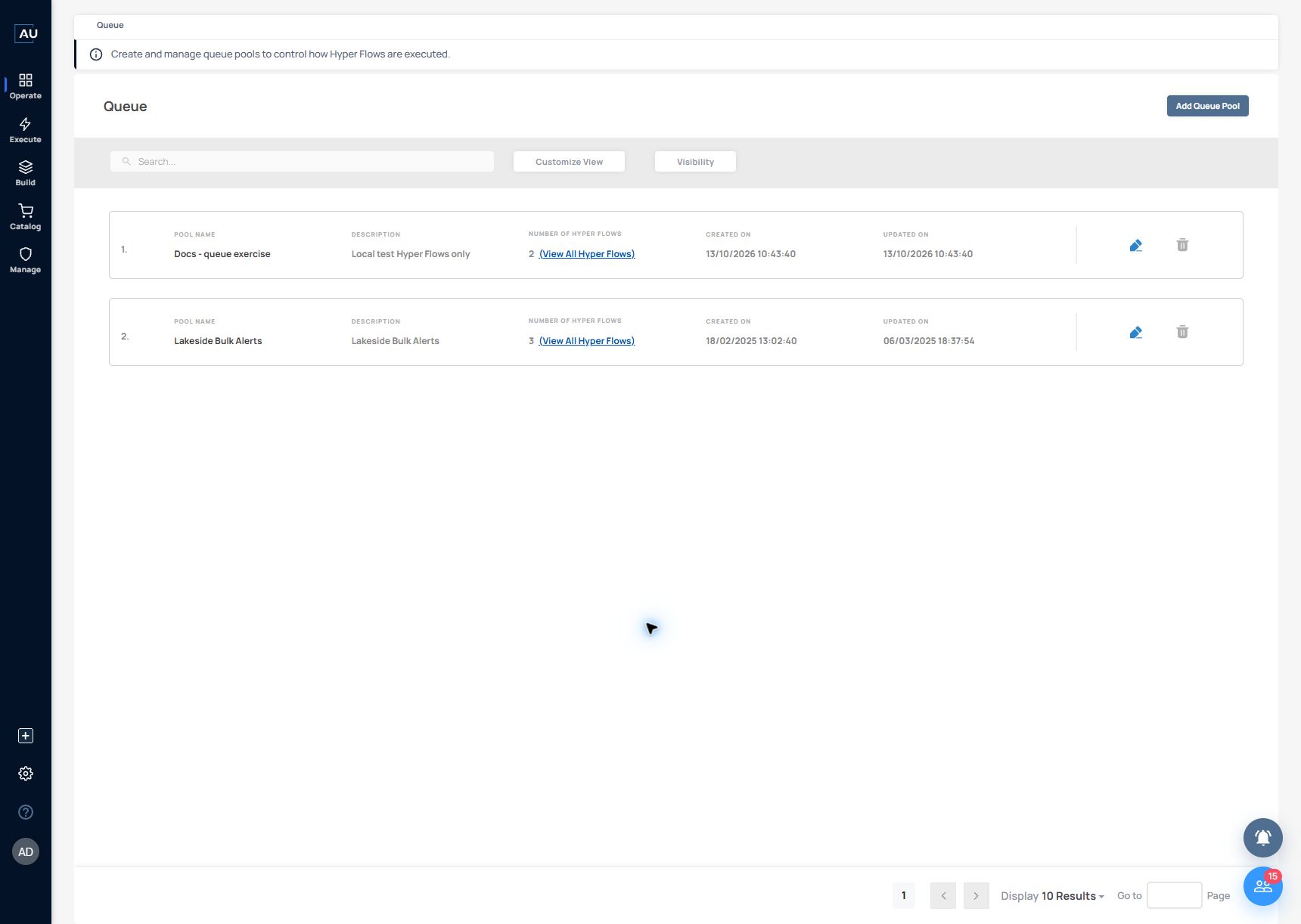
In the 13 October 2026 example, the saved queue list shows Docs - queue exercise with two Hyperflows and a created time of 10:43:40. This confirms the saved pool and member count. The separate A/B run is still needed to check execution order.

<figure><img src="https://3857940684-files.gitbook.io/~/files/v0/b/gitbook-x-prod.appspot.com/o/spaces%2FJcSHU5jP5GABQrGmWvW2%2Fuploads%2F3SNHEimgeUrZOhBy6q0J%2Fqueue-saved.jpg?alt=media" alt="The saved pool contains two Hyperflows. Queue membership and execution order are separate checks."><figcaption><p>The saved pool contains two Hyperflows. Queue membership and execution order are separate checks.</p></figcaption></figure>