> For the complete documentation index, see [llms.txt](https://docs.autommate.com/userguide/llms.txt). Markdown versions of documentation pages are available by appending `.md` to page URLs; this page is available as [Markdown](https://docs.autommate.com/userguide/operate-and-troubleshoot/handle-errors-and-debug-a-flow.md).

# Handle errors and debug a flow

Build a small Hyperflow that parses a request, deliberately break its XML, and compare an unhandled failure with Continue and Retry behavior. The example uses local text only, so you can inspect error handling without sending a message or changing an external system.

The central lesson is that a completed run can still contain a failed action. Check the action logs and downstream output before calling the business operation successful.

### What you will build

Start → Object / Convert Xml To Object → String / Assign → Stop

The String action is a visible marker: it proves whether execution reached the next action after XML parsing failed. It does not repair the XML or complete a business request.

| Variable        | Type   | Purpose                                             |
| --------------- | ------ | --------------------------------------------------- |
| parsed\_request | Object | Normal output from the XML parser.                  |
| parse\_error    | Object | Error assignment selected for Continue.             |
| route\_marker   | String | Downstream marker used to demonstrate continuation. |

This walkthrough was exercised in Presales on 13 October 2026 using `Docs - Error handling - 20261013`. Create your own training Hyperflow and use the development version when changing the failure behavior.

### 1. Establish a working baseline

1. Create a training Hyperflow and add **Object → Convert Xml To Object** between Start and Stop.
2. Select the action to open the **Action Control Center**.
3. Select **Manual Input** and enter the valid XML below.
4. In **Assign value to variable**, select or create the Object variable `parsed_request`.
5. Leave **Error Configuration** off for this baseline. Save, then select **Run Hyper Flow**.
6. Open the run logs, select the XML action, and inspect **Output**.

{% code collapsedlinecount="10" %}

```xml
<request><id>REQ-DEMO-002</id></request>
```

{% endcode %}

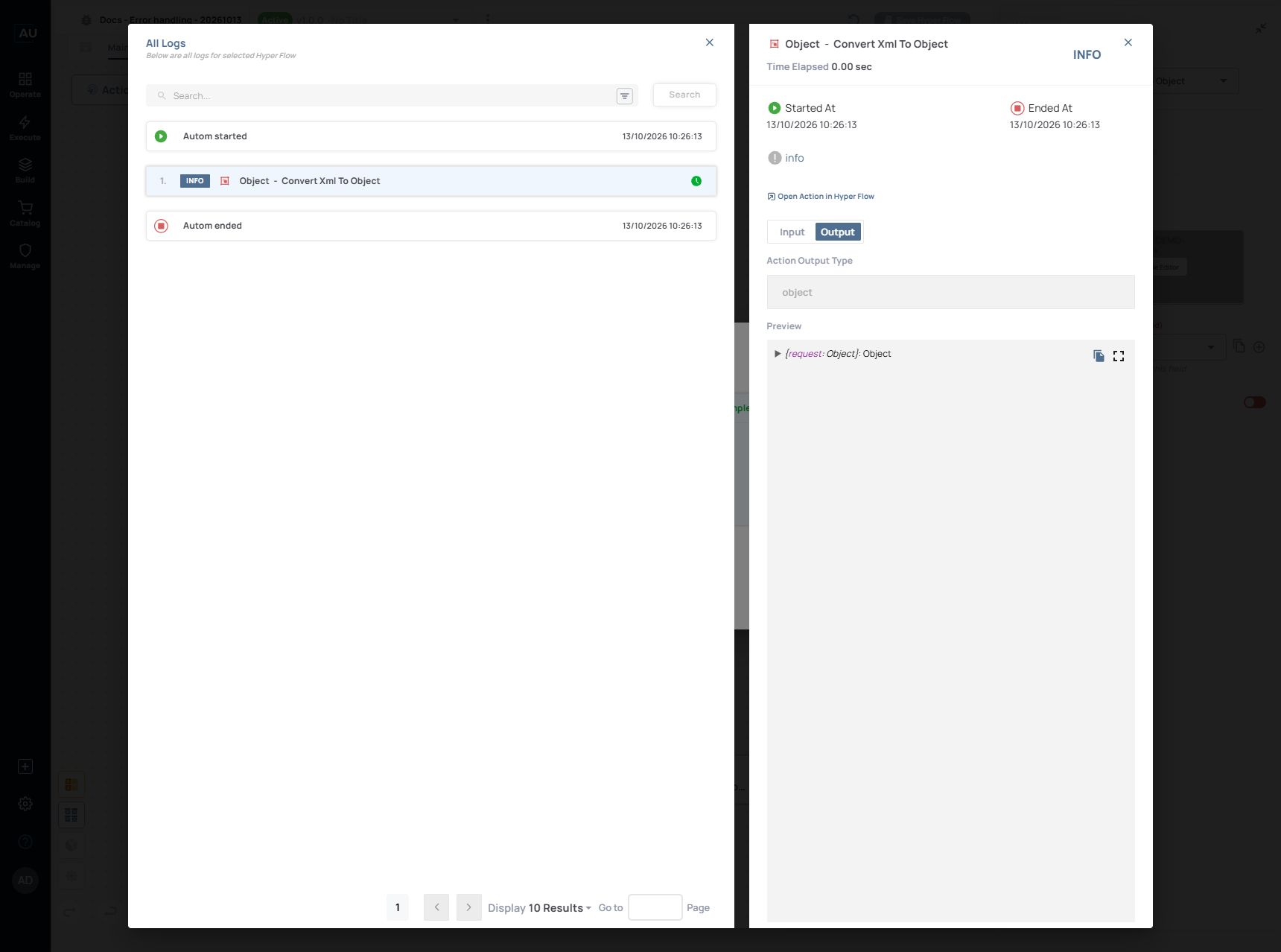
**Observed result:** the manual run at 10:26:13 completed, the action log showed INFO, and the output inspector showed an Object with a `request` child. Expand the object in your own run to inspect its fields.

<figure><img src="https://3857940684-files.gitbook.io/~/files/v0/b/gitbook-x-prod.appspot.com/o/spaces%2FJcSHU5jP5GABQrGmWvW2%2Fuploads%2FBugdvvlNOr8k2AlBd02D%2Ferror-valid-output.jpg?alt=media" alt="Successful XML conversion and Object output in the current log inspector."><figcaption><p>Successful XML conversion and Object output in the current log inspector.</p></figcaption></figure>

Keep this successful input as your baseline. It separates an input-format problem from an unrelated credential or runtime problem.

### 2. Reproduce a controlled failure

1. Replace the manual input with the malformed XML below. The closing `</id>` tag is deliberately missing.
2. Keep **Error Configuration** off.
3. Save and run the development version again.
4. Read the failure message and **Action Source**. Use **Go to Action** to return to the action that failed.

{% code collapsedlinecount="10" %}

```xml
<request><id>REQ-DEMO-002</request>
```

{% endcode %}

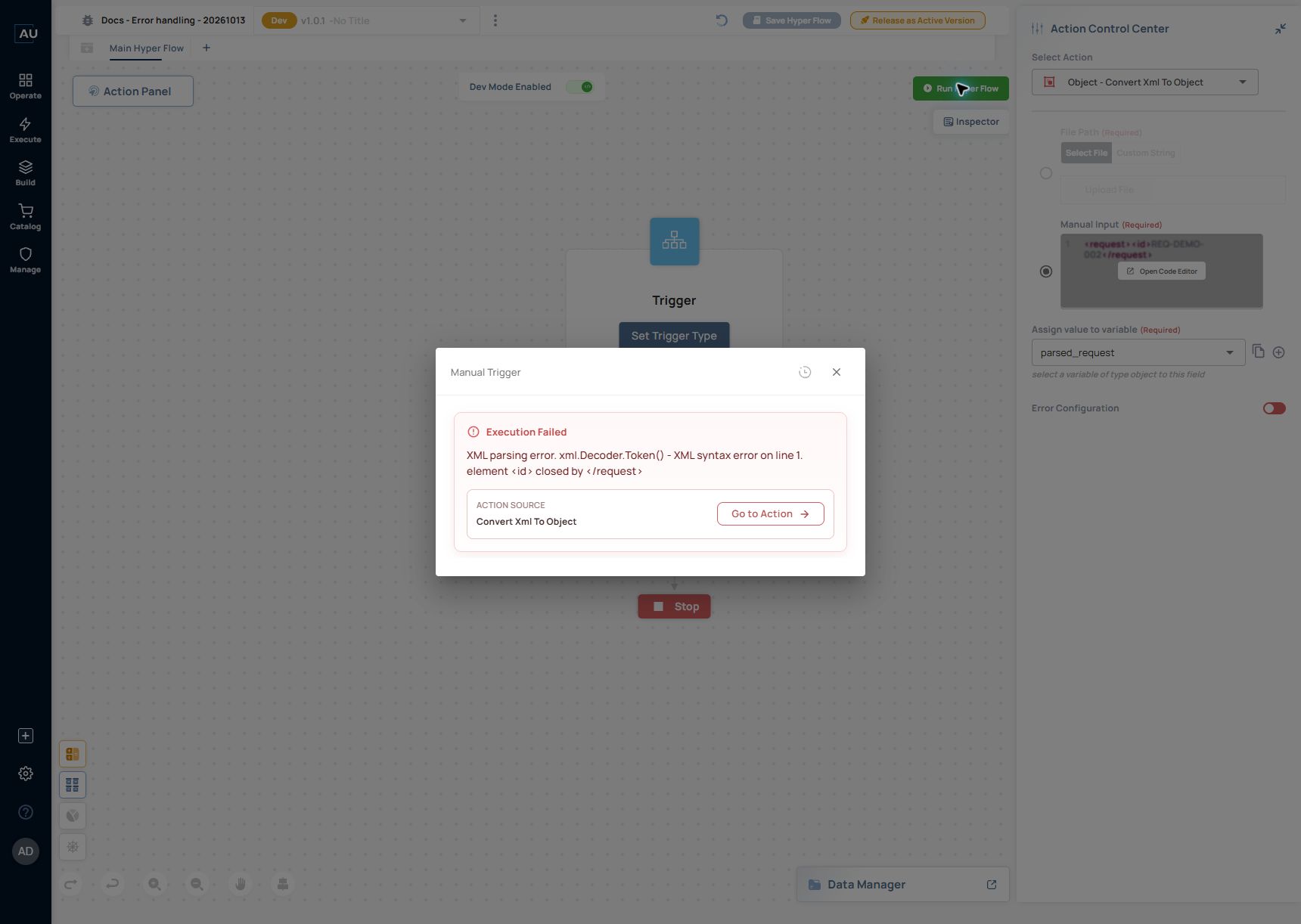
**Observed result:** the run reported **Execution Failed** with **Convert Xml To Object** as its action source. The diagnostic identified the mismatch: `element <id> closed by </request>`.

<figure><img src="https://3857940684-files.gitbook.io/~/files/v0/b/gitbook-x-prod.appspot.com/o/spaces%2FJcSHU5jP5GABQrGmWvW2%2Fuploads%2FiW3qbSwbr7Em2k9vy4gA%2Ferror-unhandled-failure.jpg?alt=media" alt="The malformed XML fails at Convert Xml To Object and identifies the source action."><figcaption><p>The malformed XML fails at Convert Xml To Object and identifies the source action.</p></figcaption></figure>

Retrying this same text cannot supply the missing tag. Retry is useful for a condition that can change between attempts, such as a temporary upstream failure. Invalid input needs correction or an explicit failure path.

### 3. Continue after the error and prove what ran

1. Keep the malformed XML so the failure is reproducible.
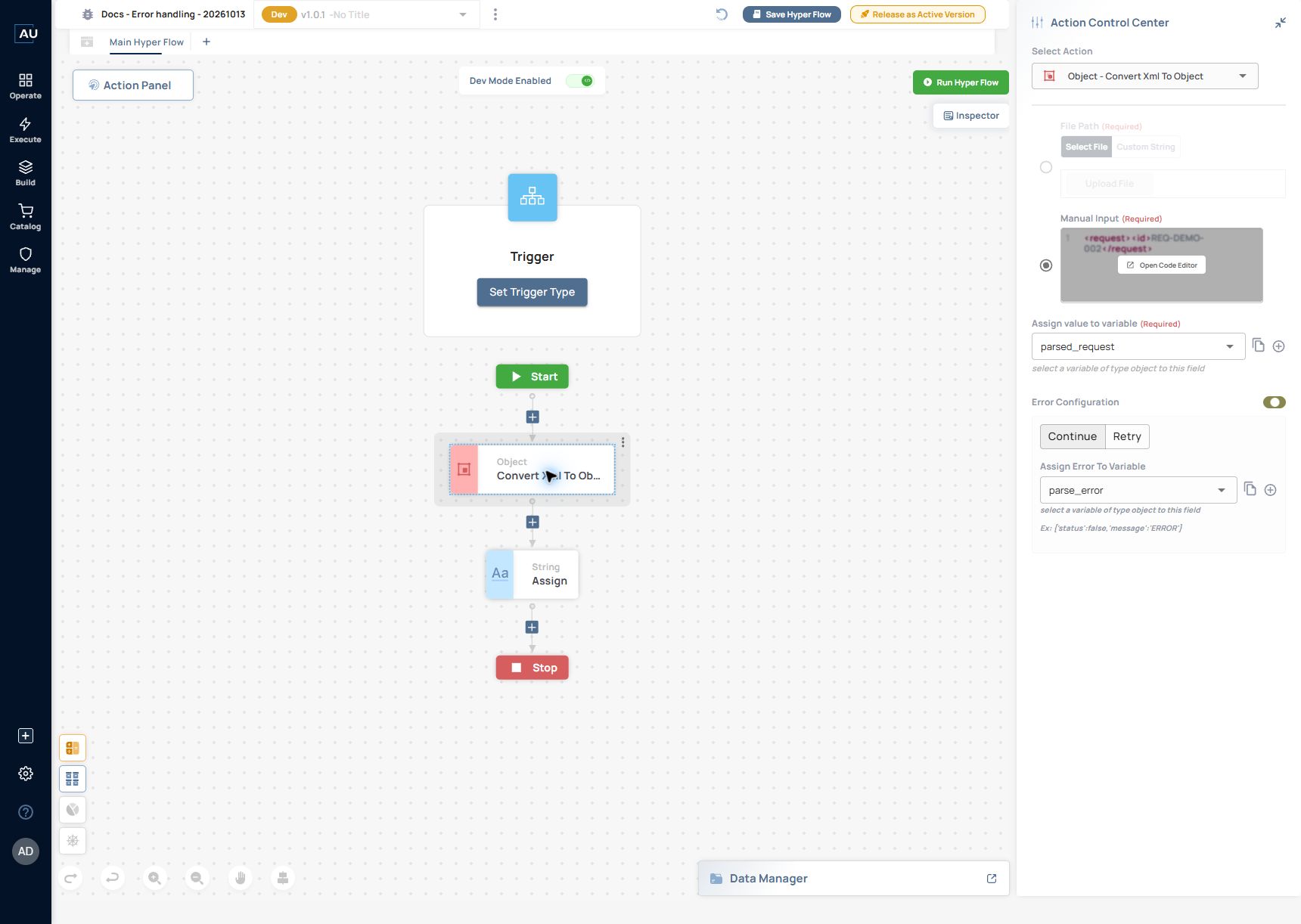
2. Enable **Error Configuration** on the XML action.
3. Select **Continue**.
4. In **Assign Error To Variable**, select or create the Object variable `parse_error`.
5. Add **String → Assign** immediately after the XML action. Set its text to `CONTINUED_AFTER_PARSE_ERROR` and assign it to the String variable `route_marker`.
6. Save and run. Open **View All Logs**, then inspect the String action's **Output**.

<figure><img src="https://3857940684-files.gitbook.io/~/files/v0/b/gitbook-x-prod.appspot.com/o/spaces%2FJcSHU5jP5GABQrGmWvW2%2Fuploads%2FdTRhPTPWkdXJuFNdtCha%2Ferror-continue-configured.jpg?alt=media" alt="Continue selected with the error assigned to an Object variable and a downstream String marker."><figcaption><p>Continue selected with the error assigned to an Object variable and a downstream String marker.</p></figcaption></figure>

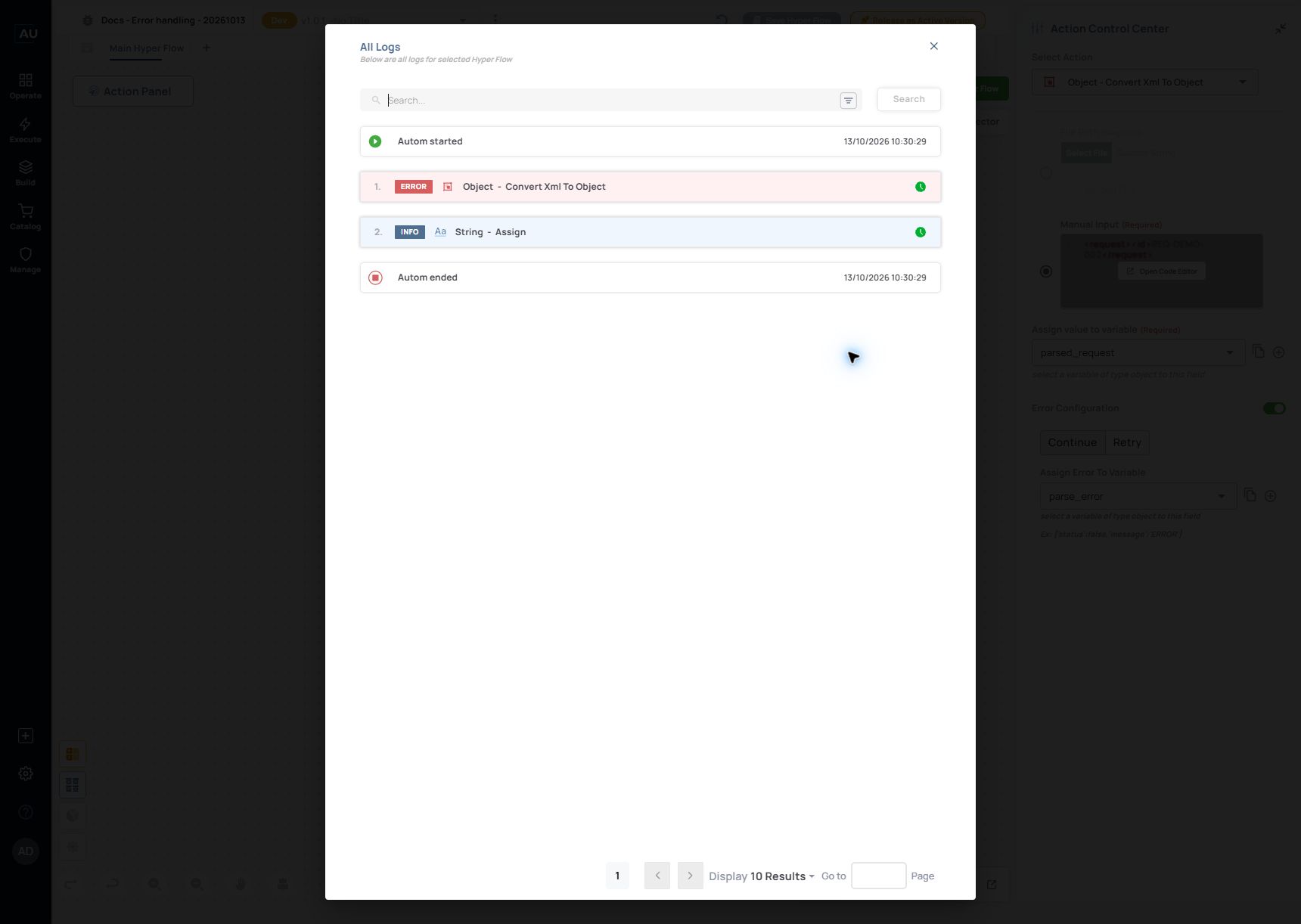
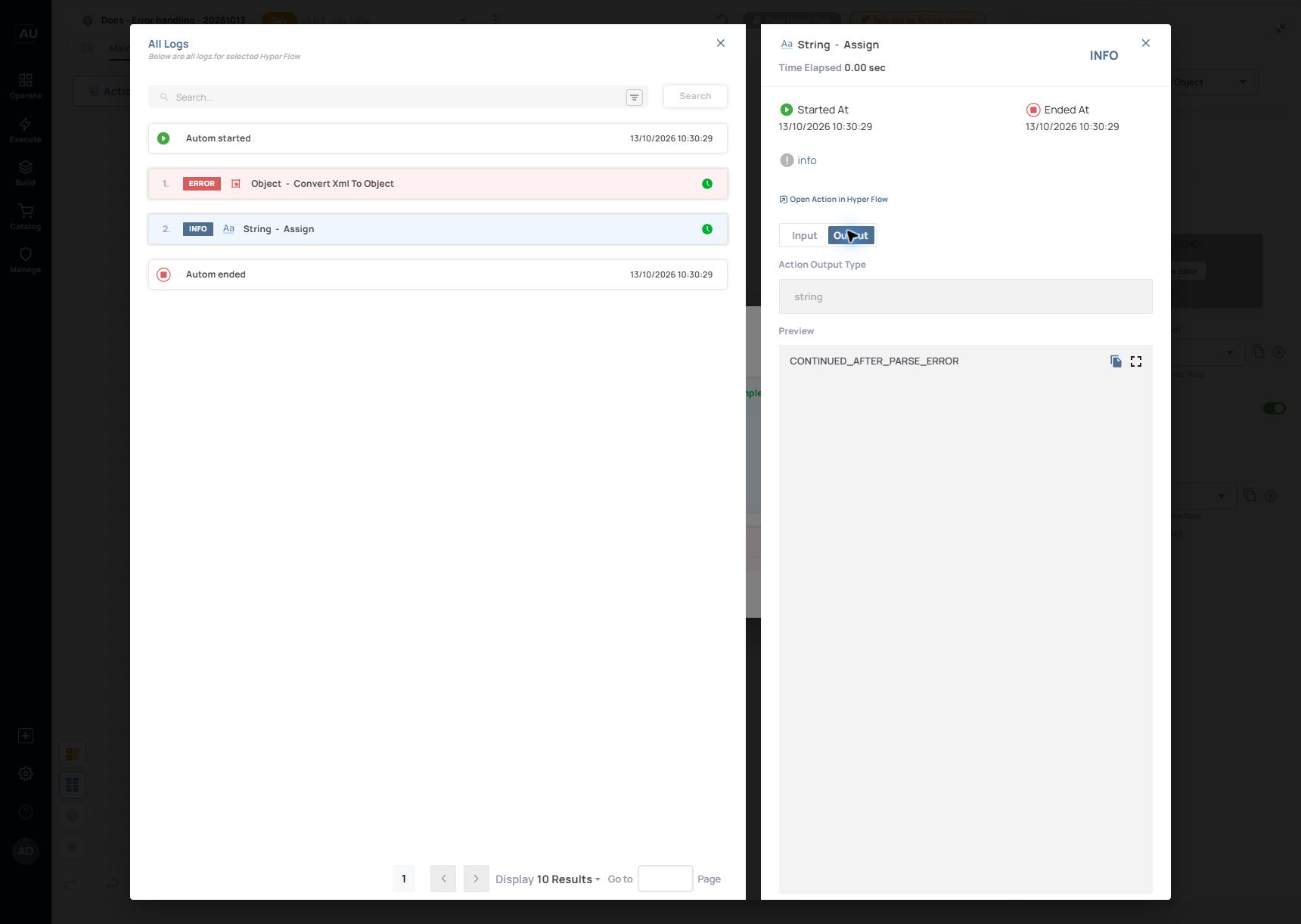
**Observed result at 10:30:29:** the run summary displayed **Completed successfully!**, while also reporting an error in the XML operation. **All Logs** contained an ERROR for **Object - Convert Xml To Object**, followed by INFO for **String - Assign**. The String output was exactly `CONTINUED_AFTER_PARSE_ERROR`.

<figure><img src="https://3857940684-files.gitbook.io/~/files/v0/b/gitbook-x-prod.appspot.com/o/spaces%2FJcSHU5jP5GABQrGmWvW2%2Fuploads%2F98iels8QcCBf5R7jSyW8%2Ferror-continue-log.jpg?alt=media" alt="The same completed run contains a failed XML action followed by the successful marker action."><figcaption><p>The same completed run contains a failed XML action followed by the successful marker action.</p></figcaption></figure>

<figure><img src="https://3857940684-files.gitbook.io/~/files/v0/b/gitbook-x-prod.appspot.com/o/spaces%2FJcSHU5jP5GABQrGmWvW2%2Fuploads%2F50rUFOKrbqiEdSQjUrn1%2Ferror-continue-output.jpg?alt=media" alt="The marker output confirms that execution continued past the failed parser."><figcaption><p>The marker output confirms that execution continued past the failed parser.</p></figcaption></figure>

This proves continuation, not a successful parse. Later actions must not assume `parsed_request` contains valid current-run data after that action fails. In a real service, route the error to an appropriate response or recovery step before using data that depended on the failed action.

The UI shows an example error object beside the assignment field. Inspect the actual captured value in your own run before binding its fields; this walkthrough does not establish a universal error-object schema for every action.

### 4. Configure Retry and its final outcome

**Error Configuration** first offers **Continue** or **Retry**. In the current editor, the retry controls are nested as follows:

{% code collapsedlinecount="10" %}

```
Error Configuration
├─ Continue
│  └─ Assign Error To Variable (Object)
└─ Retry
   ├─ “N” Times
   ├─ Delay (ms)
   └─ If the error persists after trying again, do this
      ├─ Run Error Handling Hyper Flow (checkbox)
      └─ Continue & Assign OR Stop & Response
```

{% endcode %}

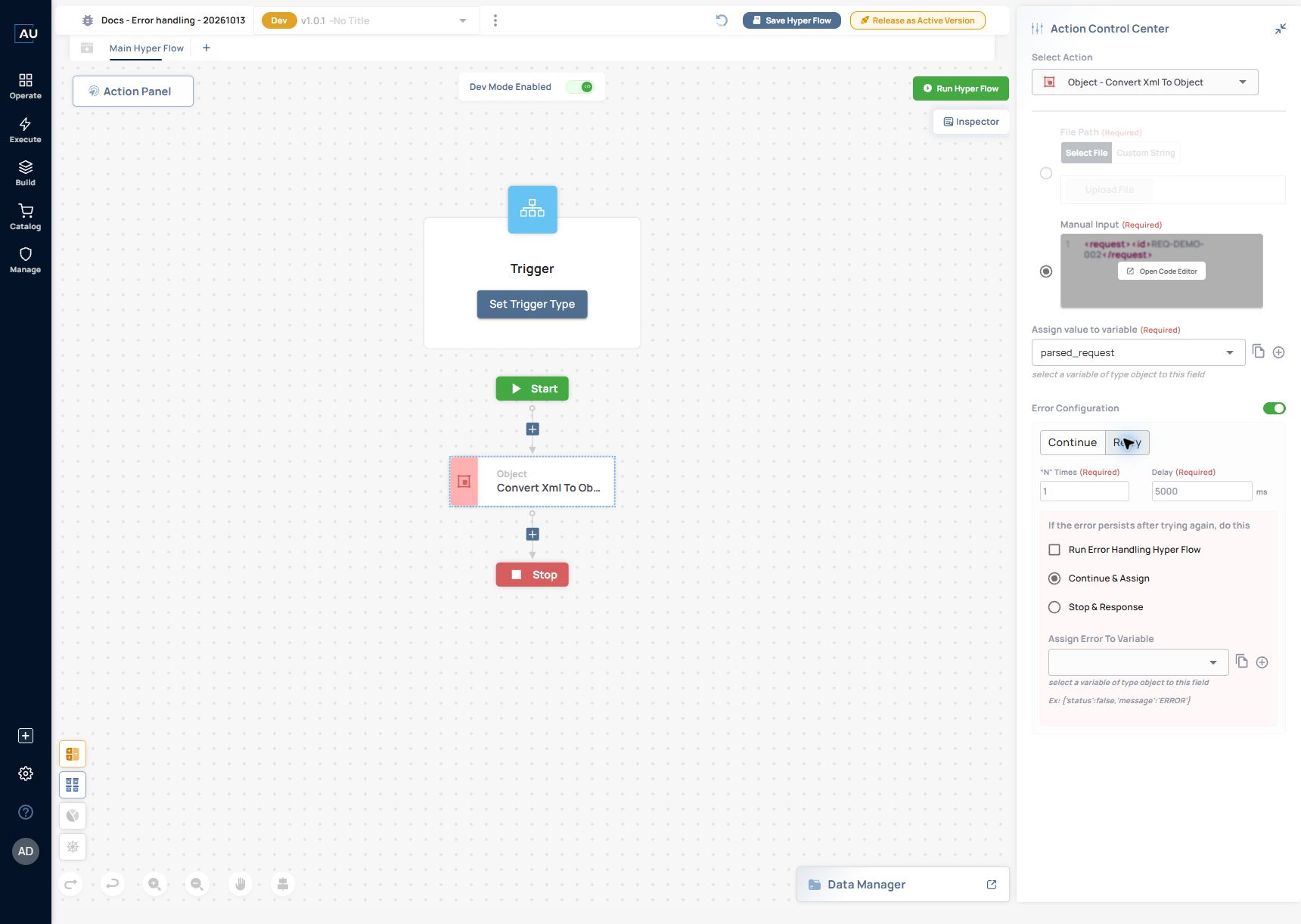
<figure><img src="https://3857940684-files.gitbook.io/~/files/v0/b/gitbook-x-prod.appspot.com/o/spaces%2FJcSHU5jP5GABQrGmWvW2%2Fuploads%2FDW5pRV0tgbtZvdzrWGHg%2Ferror-retry-options.jpg?alt=media" alt="Retry settings show an optional error-handling Hyperflow plus the final Continue or Stop choice."><figcaption><p>Retry settings show an optional error-handling Hyperflow plus the final Continue or Stop choice.</p></figcaption></figure>

The initial editor values observed were **“N” Times = 1** and **Delay = 5000 ms**. Set these deliberately for your service. The field names alone do not establish whether N means additional retries or total attempts; verify the actual attempt sequence for your runtime before using it in an SLA calculation.

**Continue & Assign** captures the remaining error and permits continuation. **Stop & Response** exposes response settings. **Run Error Handling Hyper Flow** is a separate checkbox under the persistent-error controls, rather than a third parallel top-level strategy. If you use it, test which flow is called, what context it receives, and the final outcome after it returns.

### 5. Stop and return a clear failure

1. Keep the malformed XML and downstream String marker.
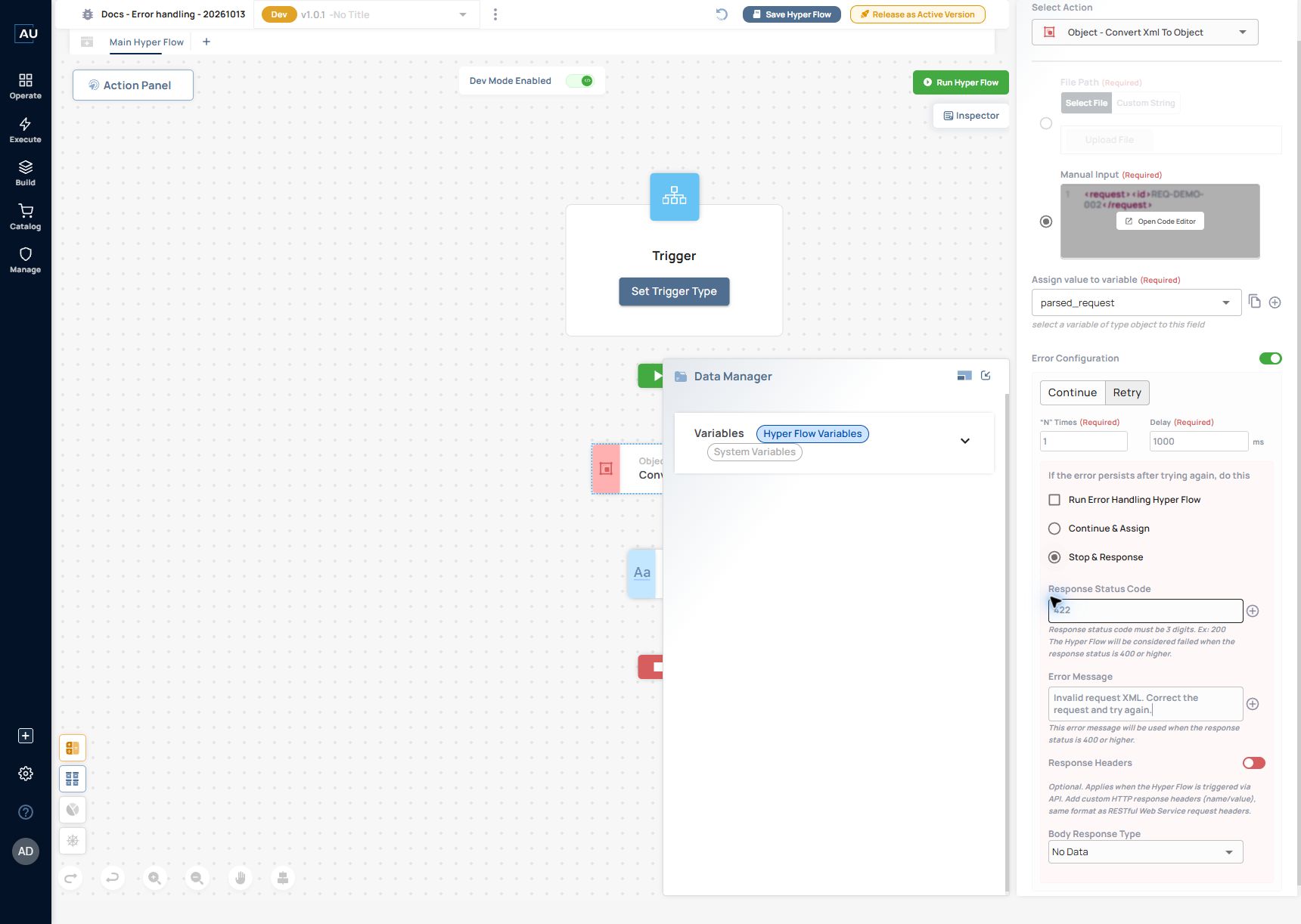
2. Select **Retry**, set **“N” Times** to `1`, and set **Delay** to `1000` ms for this short training test.
3. Leave **Run Error Handling Hyper Flow** unselected.
4. Select **Stop & Response**.
5. Set **Response Status Code** to `422` and **Error Message** to `Invalid request XML. Correct the request and try again.`
6. Leave **Response Headers** off and **Body Response Type** as **No Data** for this example.
7. Save and run. Inspect whether the XML error remains, whether the String marker runs, and how the final failure is displayed.

<figure><img src="https://3857940684-files.gitbook.io/~/files/v0/b/gitbook-x-prod.appspot.com/o/spaces%2FJcSHU5jP5GABQrGmWvW2%2Fuploads%2FKIyqAR9eREjsoOkgCuqO%2Ferror-stop-response-config.jpg?alt=media" alt="Stop &#x26; Response configuration for the controlled invalid-XML example."><figcaption><p>Stop &#x26; Response configuration for the controlled invalid-XML example.</p></figcaption></figure>

The editor explains that status codes of 400 or higher mark the Hyperflow as failed. Response Headers apply when the Hyperflow is triggered through an API. A manual run can show the failure behavior; it does not prove the exact HTTP response seen by an external caller. Validate that separately when exposing the Hyperflow through an API.

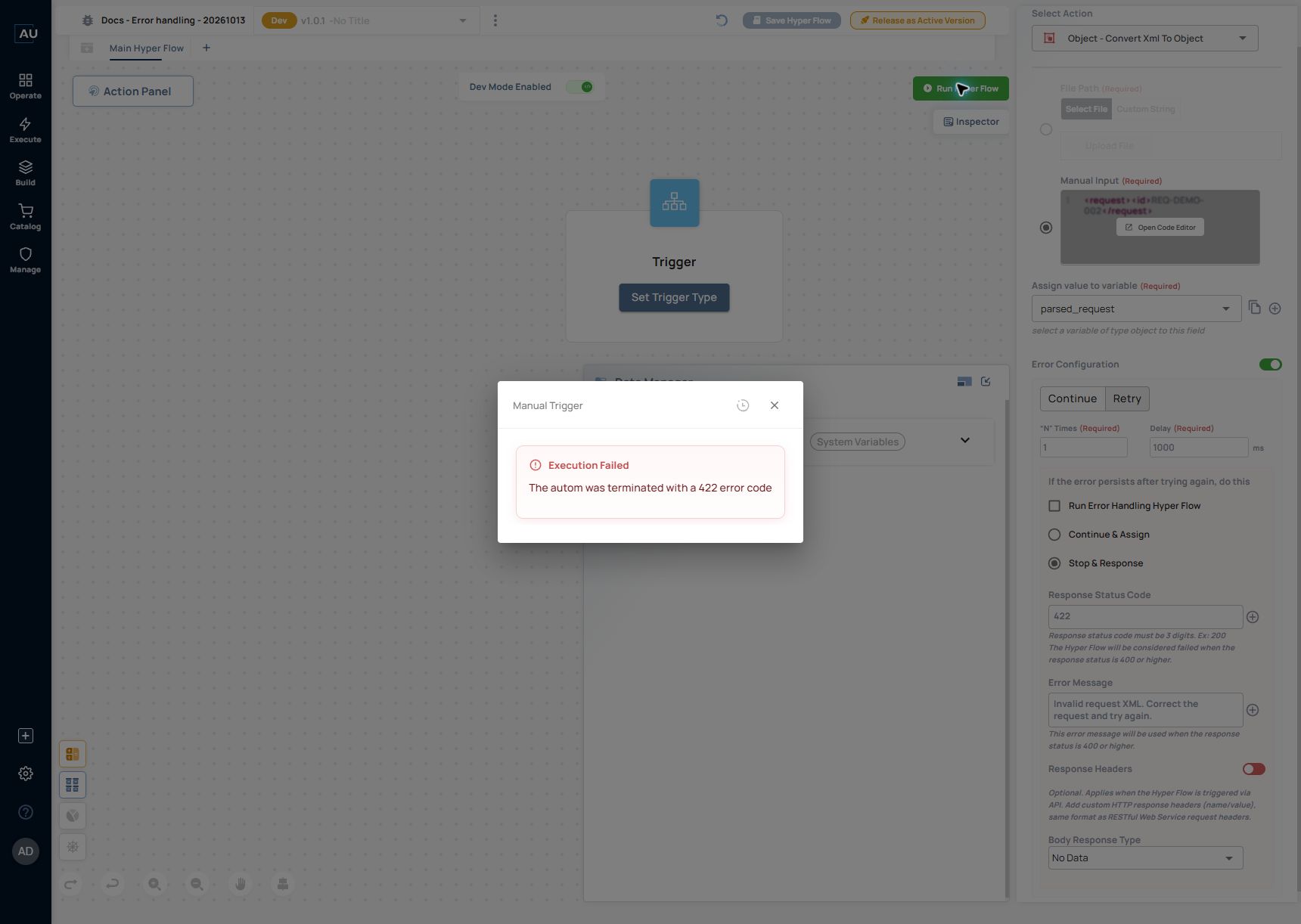
**Observed result at 10:32:43–10:32:44:** the run ended with **Execution Failed** and a `422` error code. Logs recorded two ERROR entries for the XML action and no execution of the downstream String marker. For this test, N = 1 produced an initial attempt and one retry; the elapsed time was 1.03 seconds with the configured 1000 ms delay. This is an observation of this action and runtime, not a timing guarantee for every integration.

<figure><img src="https://3857940684-files.gitbook.io/~/files/v0/b/gitbook-x-prod.appspot.com/o/spaces%2FJcSHU5jP5GABQrGmWvW2%2Fuploads%2FLDCYQq0LDi9Ua6VtmP7H%2Ferror-stop-response-result.jpg?alt=media" alt="The configured 422 outcome is visible in the manual run result."><figcaption><p>The configured 422 outcome is visible in the manual run result.</p></figcaption></figure>

<figure><img src="https://3857940684-files.gitbook.io/~/files/v0/b/gitbook-x-prod.appspot.com/o/spaces%2FJcSHU5jP5GABQrGmWvW2%2Fuploads%2FnlhSi21PHdfzzL5jei6h%2Ferror-stop-response-log.jpg?alt=media" alt="The failed run summary shows two transactions and the elapsed time for the retry test."><figcaption><p>The failed run summary shows two transactions and the elapsed time for the retry test.</p></figcaption></figure>

### 6. Add a separate error-handling Hyperflow

Use a separate error-handling branch when failure handling needs its own sequence. This exercise adds a local marker so you can prove that the branch ran without sending a notification or changing an external record.

1. In the XML action's **Retry** settings, keep **Stop & Response**, status `422` and the training message from step 5.
2. Select **Run Error Handling Hyper Flow** and choose **Create Error Handling Hyper Flow**.
3. In **Add Tab**, enter `Handle invalid request` and select the required color.
4. In the new error-handling tab, add **String → Assign** between its Start and Stop. Assign `ERROR_BRANCH_EXECUTED` to the String variable `route_marker`.
5. Return to **Main Hyper Flow** and select the XML action. Confirm that **Show Error Handling Hyper Flow** is available, then save.
6. Run the same malformed-XML test. Open **All Logs** and use the failed action's **E** icon, **Open error handling logs**, to inspect the error-handling branch.
7. Open the branch's String action and inspect **Output**.

<figure><img src="https://3857940684-files.gitbook.io/~/files/v0/b/gitbook-x-prod.appspot.com/o/spaces%2FJcSHU5jP5GABQrGmWvW2%2Fuploads%2FdRbstOKTPGPVxxqOGWwR%2Ferror-handler-branch.jpg?alt=media" alt="The separate Handle invalid request tab contains a local String marker."><figcaption><p>The separate Handle invalid request tab contains a local String marker.</p></figcaption></figure>

<figure><img src="https://3857940684-files.gitbook.io/~/files/v0/b/gitbook-x-prod.appspot.com/o/spaces%2FJcSHU5jP5GABQrGmWvW2%2Fuploads%2FWJXuFsYMvIXscsLrxF5w%2Ferror-handler-linked.jpg?alt=media" alt="The main action links to its error-handling Hyperflow while retaining Stop &#x26; Response."><figcaption><p>The main action links to its error-handling Hyperflow while retaining Stop &#x26; Response.</p></figcaption></figure>

**Observed result at 10:36:24–10:36:25:** the main flow still ended with `422`. Its logs showed the failed XML attempt, `Trying again, retry number 1`, a second XML error and `retry ended. Autom is stopped.` The error-handling logs separately showed **String - Assign** with INFO and output `ERROR_BRANCH_EXECUTED`.

<figure><img src="https://3857940684-files.gitbook.io/~/files/v0/b/gitbook-x-prod.appspot.com/o/spaces%2FJcSHU5jP5GABQrGmWvW2%2Fuploads%2FP2dasi7Kn2pNsL3hIxP6%2Ferror-handler-output.jpg?alt=media" alt="The error-handling log and output prove that the separate branch executed."><figcaption><p>The error-handling log and output prove that the separate branch executed.</p></figcaption></figure>

The handler executed successfully, but it did not turn the parent's chosen failure outcome into success or run the main flow's downstream continuation marker. This is useful when recording a failure or preparing a controlled response while preserving a clear failed result. Verify any context bindings and external side effects separately before expanding the handler.

### 7. Fix the input and rerun

Restore the valid XML from step 1. Save, rerun the same development version, and check the XML action's Object output and the run logs. Record the corrected result alongside the failing run before promoting a version used by others.

Choose marker text appropriate to the path being tested; `CONTINUED_AFTER_PARSE_ERROR` is a training label and should not become a business success message.

### Read the evidence at three levels

| Level           | What to check                                     | What it establishes                                |
| --------------- | ------------------------------------------------- | -------------------------------------------------- |
| Run             | Status, time, version and trigger                 | Whether that execution ended, failed or continued. |
| Action          | ERROR/INFO entry, input, output and source action | Which step failed and whether a later step ran.    |
| Business result | The intended external record or state             | Whether the service actually achieved its outcome. |

Use **Open Action in Hyper Flow** from a log detail to inspect the action configuration. Compare the version and input of the failing run with a known successful run. Change one relevant setting at a time so the next result is interpretable.

### Adapt the pattern to a real service

* Use Continue only when the following actions can handle the missing or failed result.
* Use bounded retry for transient failures, with a final failure outcome. Check for duplicate effects before retrying an action that creates or updates an external record.
* Keep request identifiers and useful diagnostics in logs. Exclude credentials and unnecessary personal data from screenshots and support examples.
* Test the success path, the controlled failure path, and the final outcome after retry separately.

Continue with [Monitor runs and inspect logs](/userguide/operate-and-troubleshoot/monitor-executions-and-retain-useful-evidence.md), [the failed 401 request example](/userguide/operate-and-troubleshoot/trace-a-failed-run-to-a-401-unauthorized-action.md), or [Build a Hyperflow](/userguide/build-automations/build-a-hyperflow.md).