> For the complete documentation index, see [llms.txt](https://docs.autommate.com/userguide/llms.txt). Markdown versions of documentation pages are available by appending `.md` to page URLs; this page is available as [Markdown](https://docs.autommate.com/userguide/integrations-and-api/libraries/utility/time-management.md).
# Time Management
## Introduction
Use Time Management → Delay to pause the current execution for a configured interval. Configure the trigger separately when the requirement is to start a new execution at a planned time.
Use Delay to pause the current execution for a bounded interval. Configure the trigger separately when the requirement is to start work at a planned time or in response to an external event.
## What is Time Management?
The 'Time Management' component provides the Delay action to pause the current execution for a configured interval. The documented Delay action pauses subsequent actions in the current execution. Scheduled triggers are configured separately.
#### Key Features
* **Delay Action**:
* Introduce a delay in the workflow execution for a specified duration.
## How To Use
### Delay Action
**Description:** The 'Delay' action is used to pause the workflow execution for a specified period of time.
**Usage:**
1. **Drag and Drop**:
* Place the 'Delay' action below the action you want to delay.
* This ensures that the specified delay occurs after the preceding action.
2. **Set Delay Time**:
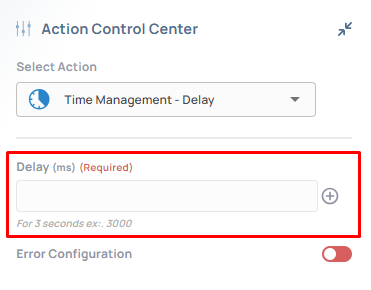
* Enter the desired time duration in milliseconds.
* For reference, 1 second equals 1000 milliseconds.
**Example:**
If you want an action to occur 5 seconds after a preceding action:
* Drag the 'Delay' action below the preceding action.
* Set the delay time to 5000 milliseconds (5 seconds).
Earlier UI reference: Time Management Delay Action. Check field labels against the installed library version.
### Advanced Usage
**Best Practices**
* **Sequencing Actions**:
* Use the 'Delay' action to sequence actions at specific intervals.
* **Scheduling Tasks**:
* Use a scheduled trigger to start an execution at a planned date and time; Delay pauses an execution that has already started.
* **Bounded Waiting**:
* A fixed delay does not confirm that an external event has happened. Check the required condition or use the appropriate event/resume mechanism.
***
## Additional Tips
### [**Use Cases**](/userguide/start-here/use-cases.md)
### [FAQ](/userguide/operate-and-troubleshoot/common-tasks-and-questions.md)
### Worked example: distinguish a delay from a schedule
A Delay pauses the current execution. Use a scheduled trigger when the requirement is to start a new execution at a planned date/time.
1\. In an isolated Hyperflow, add a String Assign action returning before-delay.
2\. Place Time Management → Delay next in the path and set its duration to 1000 milliseconds. Add a second String Assign returning after-delay.
3\. Run once and open the action logs. Confirm that the first String action precedes Delay and the second follows it.
4\. Compare available action timestamps or duration details. The expected pause is approximately one second plus execution overhead; the complete run is not guaranteed to finish in exactly one second.
5\. Keep Delay bounded. For waiting on an external approval, use the relevant service waiting/resume design rather than extending a timer indefinitely.