> For the complete documentation index, see [llms.txt](https://docs.autommate.com/userguide/llms.txt). Markdown versions of documentation pages are available by appending `.md` to page URLs; this page is available as [Markdown](https://docs.autommate.com/userguide/integrations-and-api/libraries/transform/text.md).

# Text

## Introduction

The 'Text' operation in Autom Mate provides functionalities for working with text documents and text-based data. This operation includes actions for reading and saving text data, essential for various text processing tasks.

The purpose of the 'Text' component is to offer efficient ways to handle text documents and data within automated workflows. It enables users to read existing text files, process the data, and save the results for future use.

## What is Text?

The 'Text' component provides actions to read and save text-based data. These operations are vital for tasks involving text processing, data extraction, and document management.

#### Key Features

* <mark style="color:orange;">**Reading Text Data**</mark><mark style="color:orange;">:</mark>
  * <mark style="color:orange;">Read existing text documents or text-based data.</mark>
* <mark style="color:orange;">**Saving Text Data**</mark><mark style="color:orange;">:</mark>
  * <mark style="color:orange;">Save processed data into text documents or data files.</mark>

## How To Use Action

### Text Read

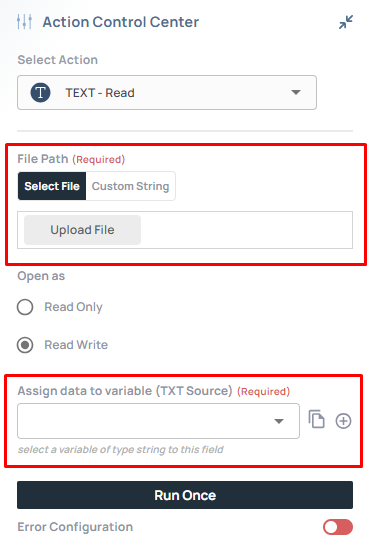
<figure><img src="https://3857940684-files.gitbook.io/~/files/v0/b/gitbook-x-prod.appspot.com/o/spaces%2FJcSHU5jP5GABQrGmWvW2%2Fuploads%2FW0mBTavSnQGBF0o3zdRy%2Fhy26U9cA4Aah2tws9uqo-image.png?alt=media" alt="Earlier UI reference: Text Read. Check field labels against the installed library version."><figcaption><p>Earlier UI reference: Text Read. Check field labels against the installed library version.</p></figcaption></figure>

**Description:** The 'Read' action in the 'Text' component is used to load existing text documents or text-based data.

**Usage:**

* **File Path**:
  * <mark style="color:green;">Specify the path of the text document or data to be read.</mark>
* <mark style="color:green;">The 'Read' action loads the specified text data for further processing.</mark>

{% hint style="info" %}

### **Hint**

If you're working with text files larger than 250MB, consider splitting them into smaller files or using specialized tools for processing. This ensures seamless integration with the **Text Read** action and avoids workflow interruptions.
{% endhint %}

***

### Text Save

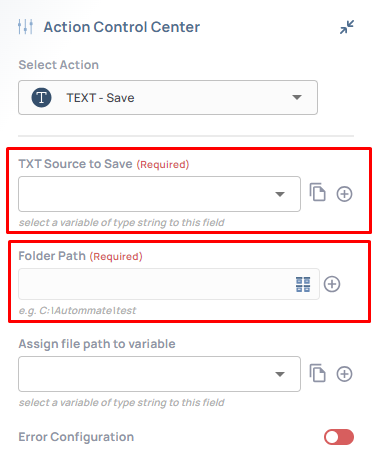
<figure><img src="https://3857940684-files.gitbook.io/~/files/v0/b/gitbook-x-prod.appspot.com/o/spaces%2FJcSHU5jP5GABQrGmWvW2%2Fuploads%2FxXFzD10QCjJrgEAMFF50%2FNqHacevb52XG7ILNlPAA-image.png?alt=media" alt="Earlier UI reference: Text Save. Check field labels against the installed library version."><figcaption><p>Earlier UI reference: Text Save. Check field labels against the installed library version.</p></figcaption></figure>

**Description:** The 'Save' action in the 'Text' component allows users to save processed data into text documents or data files.

**Usage:**

* **File Path**:
  * <mark style="color:green;">Specify the path where the processed data will be saved.</mark>
* <mark style="color:green;">The 'Save' action stores the result of the operation into the specified file.</mark>

***

## Additional Tips

### [**Use Cases**](/userguide/start-here/use-cases.md)

### [FAQ](/userguide/operate-and-troubleshoot/common-tasks-and-questions.md)

### Worked example: read a small text resource

Create a UTF-8 test file named docs-request.txt with REQ-DEMO-001 on the first line and department=finance on the second. Use a disposable resource visible to the selected runtime.

1\. Add Text → Read and set File Path to the actual test resource path.

2\. Select the output assignment offered by the installed action and run the isolated path. Inspect the returned text before adding Text → Save.

3\. Expect both lines to be present in the same order. Record the newline representation if another system requires a specific line ending.

4\. If the file is missing, compare the execution host and resource path with the location where the file was uploaded. A browser-local file path is not automatically a runtime file path.

5\. For a later Save test, use a dedicated output path and inspect the action for its required content input before running; do not overwrite the input file while learning the mapping.