> For the complete documentation index, see [llms.txt](https://docs.autommate.com/userguide/llms.txt). Markdown versions of documentation pages are available by appending `.md` to page URLs; this page is available as [Markdown](https://docs.autommate.com/userguide/integrations-and-api/libraries/transform/repeatable.md).

# Repeatable

## Introduction

The Repeatable Action in Autom Mate allows users to iterate through data sets, such as numeric arrays or data tables, performing operations on each element or row sequentially.

The purpose of the Repeatable Action is to streamline processes that require performing actions on each item or row within a dataset, making it ideal for tasks like processing Excel rows, data tables, emails, and more.

## What is Repeatable?

The Repeatable Action provides two types of looping:

1. **Variable: For each data in variable**:
   * Used to iterate through each data element in a variable, processing them one by one.
   * Suitable for iterating over arrays, lists, or similar data structures.
2. **Mail: For each mail in variable**:
   * Designed for iterating through each email in an array variable, typically used after the Get Mail Action.
   * Ideal for processing email data, extracting information, and performing actions on each email.

## How To Use Action

### Variable: For Each Data in Variable

**Description:** The **Repeat Action** for data elements allows users to perform actions on each item in a variable, processing them sequentially.

**Usage:**

1. **Data Of The List**:
   * <mark style="color:green;">Select the variable containing the data elements to iterate through.</mark>
2. **Choose Variable**:
   * <mark style="color:green;">Assign each data element to this variable for processing.</mark>
   * <mark style="color:green;">Click the "+" button to add a new variable if needed.</mark>
3. **Assign an Index**:
   * <mark style="color:green;">Select or create a new number variable to assign an index to each iteration.</mark>
   * <mark style="color:green;">The index starts from 1, representing the order of the data element.</mark>
4. **Execution**:
   * <mark style="color:green;">Drag and drop other actions into the Repeat Action to execute for each data element.</mark>

### Mail: For Each Mail in Variable

**Description:** The **Repeat Action** for emails allows users to iterate through each email in an array variable, processing them one by one.

**Usage:**

1. **Data Of The List**:
   * <mark style="color:green;">Select the array variable containing the emails to iterate through.</mark>
2. **Choose Variable**:
   * <mark style="color:green;">Assign each email to this variable for processing.</mark>
   * <mark style="color:green;">Click the "+" button to add a new variable if needed.</mark>
3. **Execution**:
   * <mark style="color:green;">Drag and drop other actions into the Repeat Action to execute for each email.</mark>

**Inspect each mail item**

<mark style="color:orange;">**Use the returned mail item as the loop input; check its fields before accessing nested values.**</mark>

Mail items contain fields such as Id, Folder, Subject, Body, From, Cc, To, Date and Attachments. Inspect the actual Get Mail output to confirm each value type and the attachment representation before mapping the item into another action.

{% embed url="<https://drive.google.com/file/d/1VDLXcx0lEAYKrNtXNIAhhDUInPt0cJlx/view?usp=sharing>" %}

***

## Additional Tips

### [**Use Cases**](/userguide/start-here/use-cases.md)

### [FAQ](/userguide/operate-and-troubleshoot/common-tasks-and-questions.md)

### Worked example: process exactly three local items

Use a fixed three-item array before connecting a loop to external records. This gives you a visible iteration count and a bounded test.

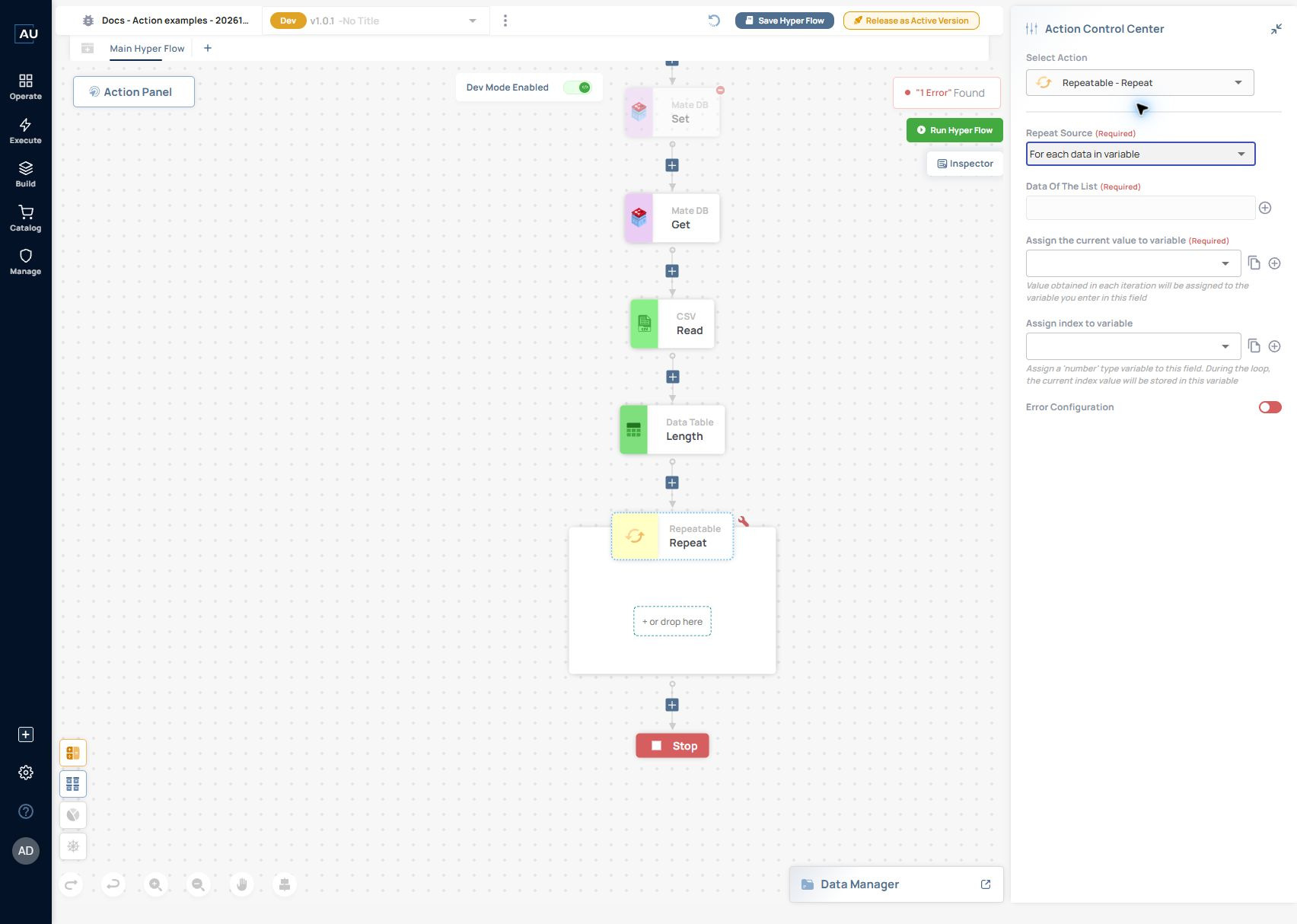
<figure><img src="https://3857940684-files.gitbook.io/~/files/v0/b/gitbook-x-prod.appspot.com/o/spaces%2FJcSHU5jP5GABQrGmWvW2%2Fuploads%2Fg8kVupQ5cckfsl2zUdTP%2Frepeat-variable-form.jpg?alt=media" alt="Current Repeatable → Repeat configuration. The source mode is selected, but the required list and current-value assignment are blank; the visible validation error belongs to this incomplete draft."><figcaption><p>Current Repeatable → Repeat configuration. The source mode is selected, but the required list and current-value assignment are blank; the visible validation error belongs to this incomplete draft.</p></figcaption></figure>

Data Of The List supplies the collection. Assign the current value to variable receives one item on each iteration. Assign index to variable accepts a Number variable for the loop position. Put the per-item action inside the visible repeat scope. These controls were inspected; the three-iteration recipe below still needs its own runtime check.

1\. Use Array → Assign to set an Array variable named departments to \["finance","hr","it"].

2\. Add Repeatable → Repeat. Set Repeat Source to For each data in variable and select departments in Data Of The List.

3\. In Assign the current value to variable, select a String variable named current\_department. In Assign index to variable, select a Number variable named department\_index.

4\. Place a String → Assign action inside the repeat scope. Map current\_department into its output so that the action log records the value for each iteration.

5\. Run once and inspect the repeated action records. Expect three iterations containing finance, hr and it. The documented index starts at 1; compare the actual index values with 1, 2 and 3 before using them in a downstream mapping.

6\. If the action appears once or more than three times, inspect its placement inside the repeat scope and the actual input array before adding writes or notifications.
