> For the complete documentation index, see [llms.txt](https://docs.autommate.com/userguide/llms.txt). Markdown versions of documentation pages are available by appending `.md` to page URLs; this page is available as [Markdown](https://docs.autommate.com/userguide/build-automations/store-values-between-runs-with-mate-db.md).

# Store values between runs with Mate DB

Use Mate DB when a Hyperflow needs to store a key/value pair for a later run of that Hyperflow. Use ordinary variables for values that only need to move between actions in the current execution.

### Before you start

* Make the Mate DB utility available to the Hyperflow.
* Define a test key and a non-sensitive sample value.
* Decide when the value should be updated and removed.
* Check the storage allowance and access scope for your environment.

A naming pattern such as `demo:customer-001:last-status` makes test keys easier to recognize. Do not store secrets in plain example values; use the application's credential facilities for authentication material.

### Write and read a value

1. Add **Mate DB > Set**.
2. Enter the key and value, or map them from variables.
3. Add **Mate DB > Get** with the same key.
4. Assign the returned value to an output variable.
5. Run the Hyperflow and compare the returned value with the value you set.
6. Run a separate controlled read using the same intended context to check the behavior your use case needs.

### Check and remove a key

* **Exists** checks whether the key is present. Inspect the returned value and its type before using it in a condition.
* **Delete** removes the selected key. Use the exact test key and verify that a subsequent lookup behaves as expected.

Avoid treating the text `"false"` as a Boolean without checking the returned type. The action reference documents the output assignment for each operation.

### Expected result

The read operation returns the saved value for the intended key. The workflow can then decide whether to update, reuse, or delete it.

### Troubleshoot

* Missing value: compare the exact key, including case and whitespace, and confirm the execution context.
* Wrong value: check whether another run writes to the same key.
* Unwanted retention: add an explicit lifecycle rule and remove test keys after testing.
* Storage or permission error: inspect the action's error and the environment's configured allowance.

Use this as a key/value store, not as a guarantee of locking, atomic updates, or unlimited retention. If multiple runs update the same business state, design and test the concurrency behavior explicitly.

### Related reference

* [Mate DB](/userguide/integrations-and-api/libraries/utility/mate-db.md)
* [Variables and input/output contracts](/userguide/build-automations/variables-and-input-output-contracts.md)

### Worked example: write a value, then read it in a later run

This exercise uses Docs - Action examples - 20261013, Dev v1.0.1. The synthetic key is docs\_20261013\_request\_status and the value is received. Both runs use the same Hyperflow; the Set form explicitly states that the data is related to and usable on this Hyperflow. Use your own unique test key.

1\. In the test Hyperflow, add Mate DB → Set. Add a key/value row: Key docs\_20261013\_request\_status and Value received. Save Hyper Flow and select Run Hyper Flow. The existing String Assign step in this example is independent of Mate DB.

<figure><img src="https://3857940684-files.gitbook.io/~/files/v0/b/gitbook-x-prod.appspot.com/o/spaces%2FJcSHU5jP5GABQrGmWvW2%2Fuploads%2FoIjI1mKU7PCPykf3ogx5%2Fmatedb-set.jpg?alt=media" alt="Set stores the synthetic key/value pair within this Hyperflow. Use a uniquely named test key."><figcaption><p>Set stores the synthetic key/value pair within this Hyperflow. Use a uniquely named test key.</p></figcaption></figure>

2\. Open the first run’s logs. On 13 October 2026 at 11:04:15, Türkiye browser time, Mate DB - Set completed with INFO. This is the write run.

3\. Return to the same Dev Hyperflow. Right-click the Set action and choose Disable. Keep the disabled action in the canvas so the next run can demonstrate that it does not write the value again.

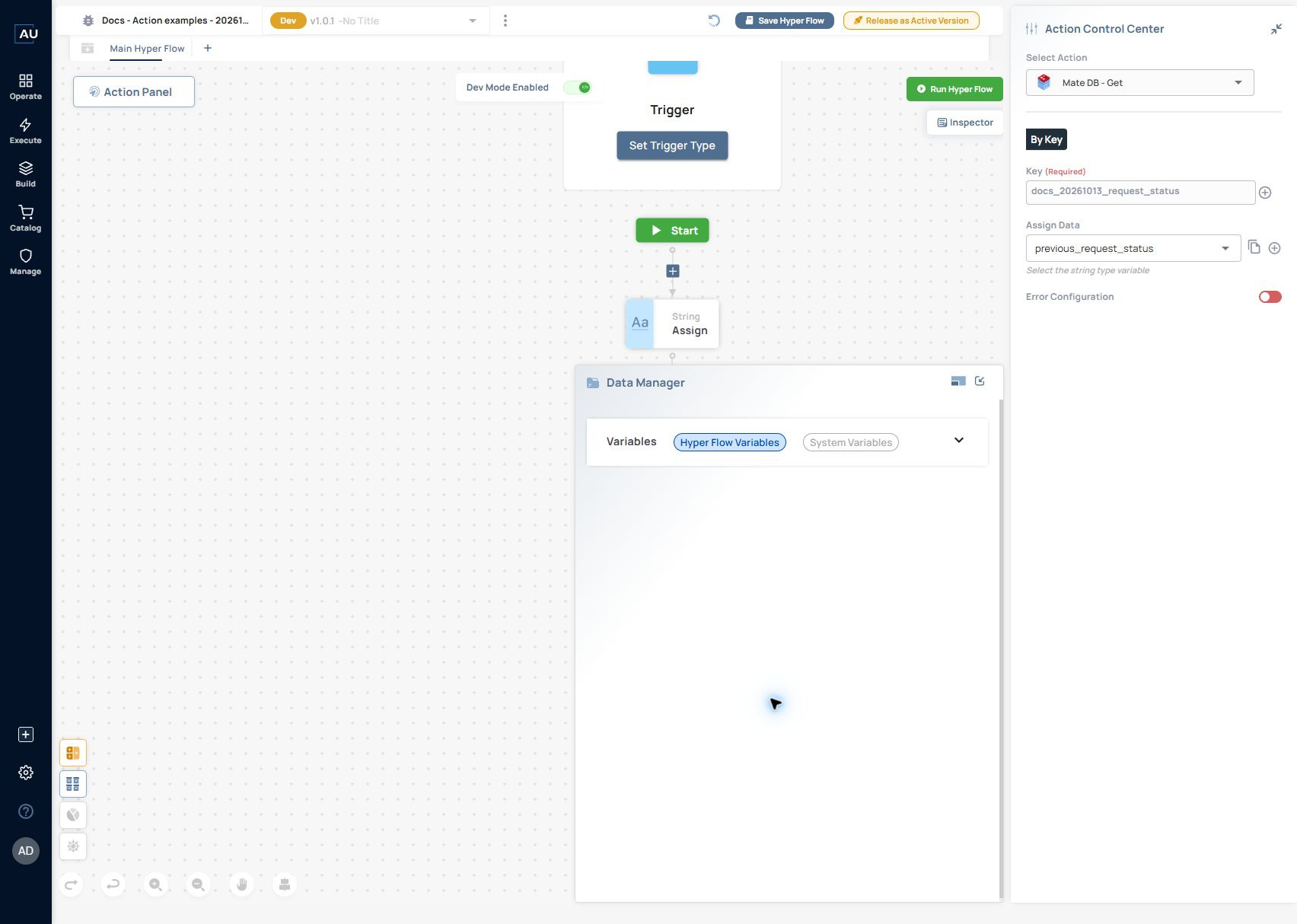
4\. Add Mate DB → Get after it. Choose By Key, enter exactly docs\_20261013\_request\_status, and select the String variable previous\_request\_status in Assign Data. Set it as an output when you also need it in the Hyperflow’s output contract. Save Hyper Flow.

<figure><img src="https://3857940684-files.gitbook.io/~/files/v0/b/gitbook-x-prod.appspot.com/o/spaces%2FJcSHU5jP5GABQrGmWvW2%2Fuploads%2FtbAjP9AfelV7A3emrTkO%2Fmatedb-get.jpg?alt=media" alt="Get uses the identical key and assigns its returned text to previous_request_status. Set is disabled for the later read run."><figcaption><p>Get uses the identical key and assigns its returned text to previous_request_status. Set is disabled for the later read run.</p></figcaption></figure>

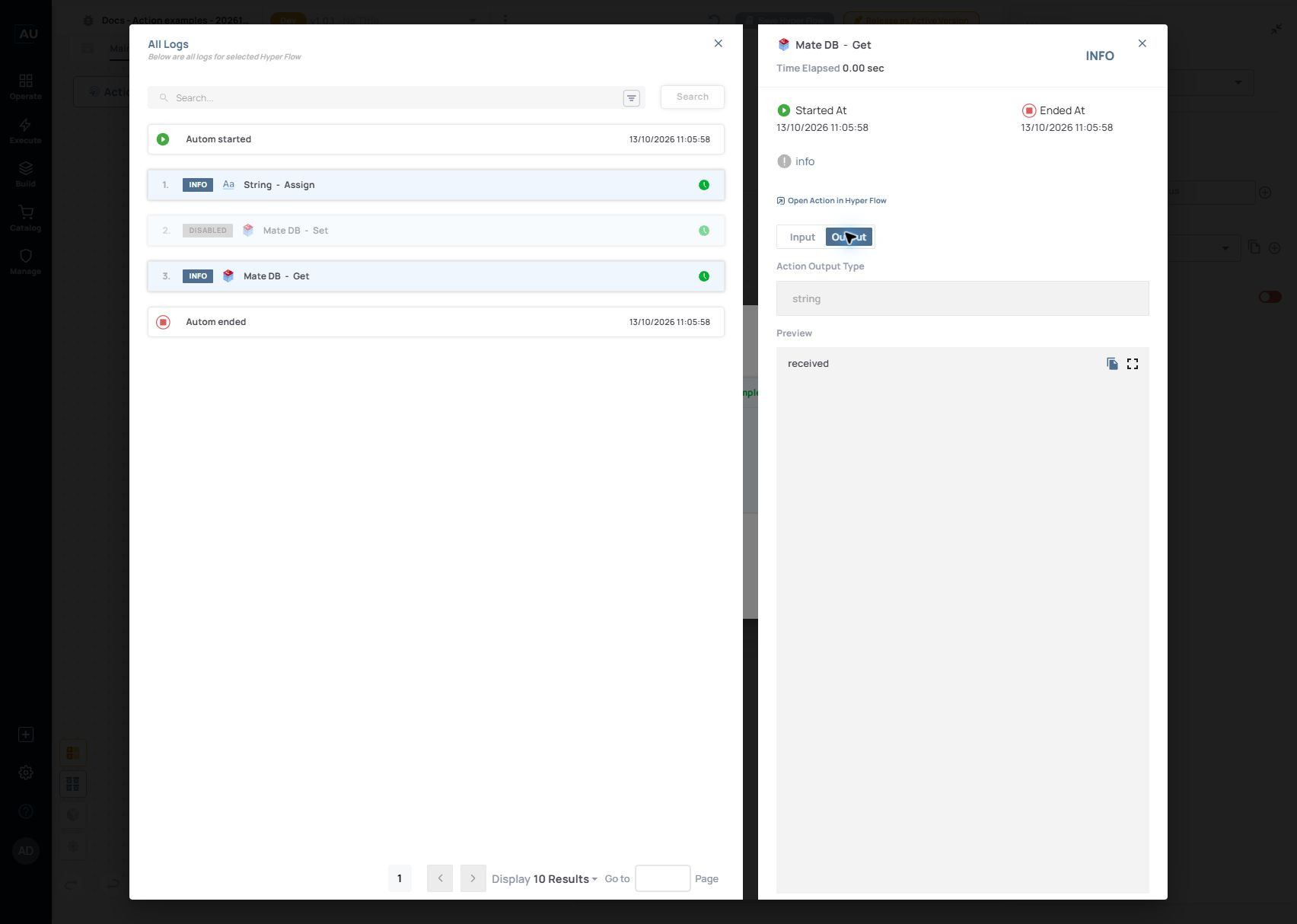
5\. Run again. Open the Mate DB - Get log, choose Fetch Input/Output Values and select Output. In the 11:05:58 run, Set was DISABLED, Get completed with INFO, Action Output Type was string and Preview was received. The second execution retrieved the earlier value without rerunning Set.

<figure><img src="https://3857940684-files.gitbook.io/~/files/v0/b/gitbook-x-prod.appspot.com/o/spaces%2FJcSHU5jP5GABQrGmWvW2%2Fuploads%2F097ym5gSIMhSgTqbdkKr%2Fmatedb-get-output.jpg?alt=media" alt="The 11:05:58 run shows Set DISABLED and Get returning the string received, preserving the earlier write across two executions."><figcaption><p>The 11:05:58 run shows Set DISABLED and Get returning the string received, preserving the earlier write across two executions.</p></figcaption></figure>

This demonstrates persistence between two separate executions of the same Dev Hyperflow. Check the applicable scope before designing a value to be shared between Hyperflows or tenants; this example does not test cross-flow access or concurrent updates.

For a follow-up update test, enable Set, change only the sample value, run it once, disable Set again and repeat Get. For cleanup, use Delete for your exact synthetic key and inspect Exists/Get afterwards. The recorded exercise above did not test update, deletion or the missing-key response.