> For the complete documentation index, see [llms.txt](https://docs.autommate.com/userguide/llms.txt). Markdown versions of documentation pages are available by appending `.md` to page URLs; this page is available as [Markdown](https://docs.autommate.com/userguide/build-automations/development-mode-and-library-insights.md).
# Use Development Mode and inspect library versions
Check the version of your Hyperflow and its application dependencies before releasing a change. Development Mode identifies development work; it is not a sandbox that prevents connected actions from affecting other systems.
## Check the version before editing
1. Open the intended Hyperflow or Work Item.
2. Read its version and **Dev** state in the header. In the Dublin Work Item editor, **Dev Mode Enabled** appears on the canvas.
3. Confirm that you are editing the intended development version before changing actions or mappings.
4. Keep the input and expected result for a small repeatable test.
**Save Hyper Flow**, **Release as Active Version** and **Run Hyper Flow** are separate actions. Saving does not release or execute the change. Running a development version can still use real application credentials.
### Read the version badge and canvas mode separately
The version badge and canvas mode describe different parts of the editor state. Read both before editing or running a flow.
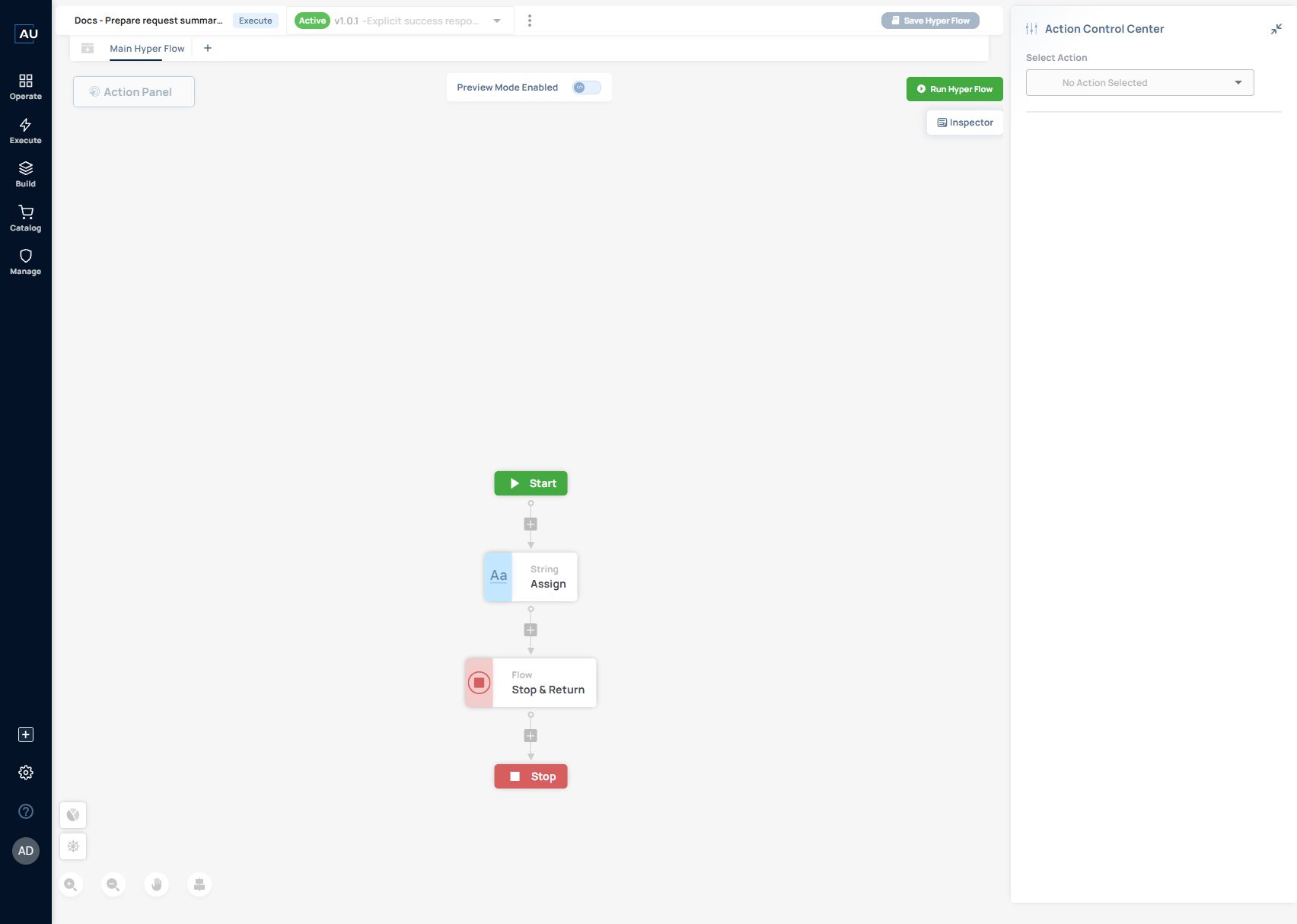
In the presales Work Item example, the development editor showed **Dev v1.0.1**, **Dev Mode Enabled**, **Save Hyper Flow**, and **Release as Active Version**. After release, the same Work Item showed **Active v1.0.1** and **Preview Mode Enabled**.
The standalone request-intake example also displayed **Active v1.0.0** in its header while **Dev Mode Enabled** appeared on its canvas. A canvas label by itself is therefore insufficient to identify the saved or released version being inspected. Check the selected version, available controls and subsequent run record together.
For a repeatable check, open the [request-summary Work Item](/userguide/service-automation/create-work-items-and-pin-released-versions.md), record the header version and canvas mode, and inspect the corresponding manual-run log. Compare the input to Stop & Return with the configuration for that version. Avoid changing a shared or operational flow simply to test the mode switch.
These screenshots verify the editor states and a Work Item release. They do not show a library upgrade, a Library Insights comparison or an isolated execution environment. Record and test application dependencies separately as described below.
## Inspect application dependencies
Where the builder provides **Library Insights**, open it to list the libraries used by the Hyperflow and their versions. Search for the application or action you need to review. The action's displayed application-version information provides a second place to check the dependency.
Earlier builder versions expose this view through a switch near the Hyperflow name, a dotted canvas and a **Library Insights** button. Use the controls in your installed build; the layout is not a separate release guarantee.
Record these details before a dependency change:
| Detail | Why it matters |
| -------------------------------- | ------------------------------------------------- |
| Hyperflow version | Identifies the logic being edited |
| Application/library version | Identifies the action definition used by the flow |
| Action inputs and output mapping | Shows what can change for the next step |
| Test record and expected result | Makes the before/after check repeatable |
## Validate and release
Test the changed action and the steps that consume its output. Once the checks pass, release the intended version. A service that pins a released Work Item does not automatically adopt a new release: update the service version and deployment deliberately.
Expected result: you can identify the released Hyperflow, its dependencies and the test result that supports the change. Continue with [versions and dependencies](/userguide/build-automations/manage-versions-and-dependencies.md).