> For the complete documentation index, see [llms.txt](https://docs.autommate.com/userguide/llms.txt). Markdown versions of documentation pages are available by appending `.md` to page URLs; this page is available as [Markdown](https://docs.autommate.com/userguide/build-automations/business-impact-estimator.md).

# Configure and interpret the Business Impact Estimator

Use the Business Impact Estimator to describe the potential value of an automated task. Its financial and time-saving outputs are estimates derived from entered assumptions; they are separate from execution counts, revenue collected and verified service outcomes.

## Prepare a task baseline

Define the manual task, the population performing it and the period you are modelling. Use a documented salary or cost basis approved for this calculation. Record who supplied each assumption and avoid including sensitive individual compensation in shared screenshots.

## Complete the three drivers

| Driver             | Inputs to review                                                                                                                 |
| ------------------ | -------------------------------------------------------------------------------------------------------------------------------- |
| Cost Reduction     | Required Resources for this Task; Average Annual Salary; Time Spent on this Task; Cost of Other Resources; Time Saved by Product |
| Revenue Generation | Average Annual Revenue/Turnover; Revenue Increases; Revenue Saved                                                                |
| Risk Avoidance     | Average Annual Revenue/Turnover; Lost Revenue Avoided; Fines Avoided                                                             |

Keep the units displayed by the form: resource count, USD, USD/year and daily or annual percentages describe different things. Required Resources is marked mandatory in the estimator reference. Check the validation displayed by your installed form when entering values.

Start with the drivers relevant to the task. A labor-saving automation does not automatically create additional revenue or avoid a fine. Explain each included effect rather than filling every field with an optimistic assumption.

## Review the outputs

The estimator reports Cost Reduction, Estimated Time Saved, Revenue Generation, Risk Avoidance and aggregate estimated impact. Inspect the result beside the inputs used to produce it.

Check for double counting. For example, the same avoided revenue loss should not be included twice under Revenue Saved and Lost Revenue Avoided. Confirm whether other-resource costs are added, deducted or shown separately in the calculation used by your build before comparing net savings.

### Worked example: calculate a simple annual productivity estimate

Use a test Hyperflow to reproduce this calculation with synthetic assumptions. This example uses only the Cost Reduction Driver; revenue and risk effects remain zero.

1\. Open the Hyperflow editor and select the Business Impact Estimator control. Expand Cost Reduction Driver.

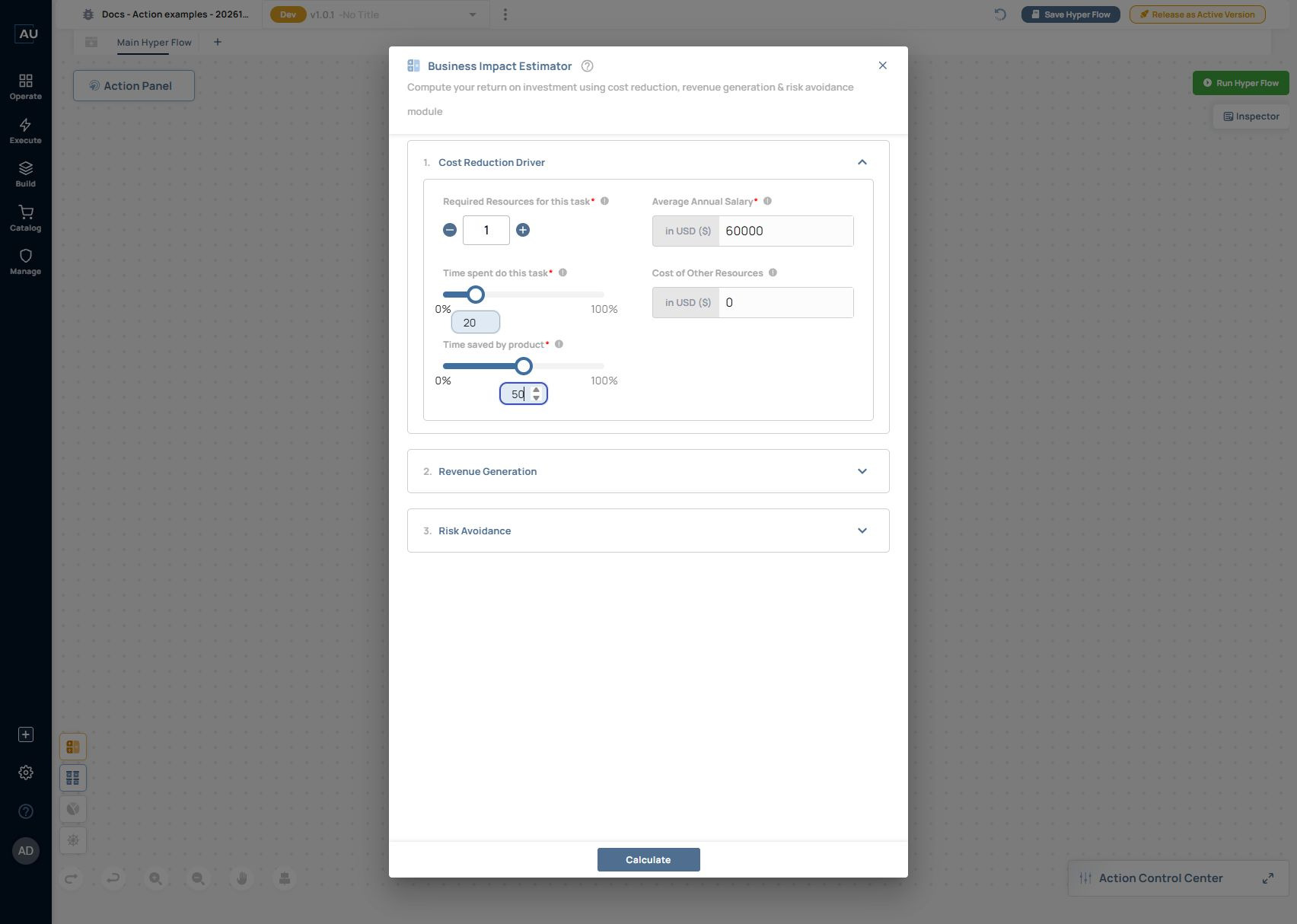
2\. Set Required Resources for this task to 1, Average Annual Salary to 60000 USD, Time spent do this task to 20%, Cost of Other Resources to 0 USD and Time saved by product to 50%. Leave the other drivers at zero.

<figure><img src="https://3857940684-files.gitbook.io/~/files/v0/b/gitbook-x-prod.appspot.com/o/spaces%2FJcSHU5jP5GABQrGmWvW2%2Fuploads%2FLu2NT5dIuv31MthrbWWW%2Fbusiness-impact-form.jpg?alt=media" alt="The synthetic cost-reduction inputs: one resource, $60,000 annual salary, 20% task time, zero other-resource cost and 50% time saved."><figcaption><p>The synthetic cost-reduction inputs: one resource, $60,000 annual salary, 20% task time, zero other-resource cost and 50% time saved.</p></figcaption></figure>

3\. Select Calculate. In the 13 October 2026 Presales exercise, BI Estimator Results displayed Total Annual Savings (A+B+C) of $6,000: (A) Productivity Costs Saved $6,000, (B) Revenue Costs Saved $0, (C) Cost Avoided & Revenue Retained $0 and Fines Avoided $0.

<figure><img src="https://3857940684-files.gitbook.io/~/files/v0/b/gitbook-x-prod.appspot.com/o/spaces%2FJcSHU5jP5GABQrGmWvW2%2Fuploads%2F7tEnlb0oII1e5YidUZRj%2Fbusiness-impact-result.jpg?alt=media" alt="Calculate returned an annual estimate of $6,000 for these inputs. The exercise did not save the estimate or measure realized savings."><figcaption><p>Calculate returned an annual estimate of $6,000 for these inputs. The exercise did not save the estimate or measure realized savings.</p></figcaption></figure>

The simple cross-check for these inputs is 1 × 60,000 × 0.20 × 0.50 = 6,000. This matches the displayed result for this case. It does not specify how other-resource costs, nonzero revenue/risk drivers, currency conversion or net benefit are calculated.

4\. Use Back to Calculator to review or change the assumptions. Save only when you intend to keep the estimate with the Hyperflow. This documentation exercise calculated the result and left it unsaved.

Keep the input assumptions alongside the displayed result. Estimated productivity value is different from cash received, actual operating savings or a completed service outcome. Measure those separately.

## Use the estimate responsibly

When sharing a result, include:

* The task and reporting period.
* The baseline inputs and units.
* The assumptions behind time saved, revenue and risk.
* The displayed estimate and any excluded costs.
* Actual execution or outcome evidence, shown separately.

Expected result: another reader can reproduce the assumptions and distinguish the estimate from measured performance. Use [Dashboard widgets](/userguide/operate-and-troubleshoot/configure-dashboard-widgets.md) to review how the estimate is displayed, and [Pulse](/userguide/operate-and-troubleshoot/understand-pulse-metrics.md) for service-outcome metrics.

If a time or cost result is unclear, retain the field values, product version and screenshot and contact **<support@autommate.com>** before relying on a formula from another version.
