> For the complete documentation index, see [llms.txt](https://docs.autommate.com/userguide/llms.txt). Markdown versions of documentation pages are available by appending `.md` to page URLs; this page is available as [Markdown](https://docs.autommate.com/userguide/ai-agent-composer/test-in-playground-and-review-logs.md).

# Test in Playground and review Logs

Use Playground to try a conversation and Logs to review its messages and replies. Test the agent with approved sample data before making it available to users.

### Start a controlled conversation

1. Open the intended agent and select **Playground**.
2. Enter a message in **Type your message...**.
3. Send the message and review the response against your expected result.
4. Test missing information and unsupported requests as well as the happy path.

In the empty Playground state, the screen says **Start a conversation** and the send button is disabled until a message is entered. Sending a message is a real test, not simply a preview of the configuration; use approved test data and understand which connected skills it may invoke.

### Practical test set

The following examples are illustrative. Adapt them to the agent's actual sources and configured capabilities.

| Scenario            | Example input                                             | Expected behavior                                                               |
| ------------------- | --------------------------------------------------------- | ------------------------------------------------------------------------------- |
| Known answer        | “What equipment is provided to new employees?”            | Answer agrees with an approved connected source.                                |
| Ambiguous request   | “Can you set this up for me?”                             | Ask which setup or service the user needs.                                      |
| Missing knowledge   | Ask about a policy absent from the connected sources.     | State the information gap and give an appropriate next step.                    |
| Missing skill input | Ask to retrieve a record without its required identifier. | Ask for the missing value rather than inventing one.                            |
| Unsupported action  | Ask for an application change no skill supports.          | Explain the limitation without claiming execution.                              |
| Skill result        | Retrieve a known accessible item.                         | Summarize the actual returned record and preserve meaningful error information. |
| Channel delivery    | Send a controlled message from the configured channel.    | The intended agent receives it and the reply reaches the intended user.         |

For a skill that changes data, check the destination record as well as the reply. Confirm that the requested change was actually made.

### Open the conversation logs

<figure><img src="https://3857940684-files.gitbook.io/~/files/v0/b/gitbook-x-prod.appspot.com/o/spaces%2FJcSHU5jP5GABQrGmWvW2%2Fuploads%2F0Jrb5xSjUDSL1iq7St0F%2Fagent-logs.jpg?alt=media&amp;token=4b476f8b-12b9-4656-8f0f-5643dd3894d3" alt="Logs tab and available date, flagged-message, and confidence-score filters"><figcaption><p>Use the date range and message filters to find the conversation you want to review.</p></figcaption></figure>

Select Logs to open All Logs. Use Filters and Refresh to locate a conversation, Export to retain available logs, and Open in Autom Builder to inspect the implementation.

If No logs found or No messages in this thread appears, check the selected date range and conversation. Start a controlled conversation and refresh the list. Export is unavailable when there are no logs.

### Find the conversation

1. Select **Filters**.
2. Choose the **Date Range** that covers your test. For a conversation from today, select **Today**.
3. Use **Show only flagged messages** when investigating flagged conversations.
4. Use **Filter by Confidence Score** when that filter is relevant to your review.
5. Select **Apply Filters**, or **Clear All** to remove the filters. **Cancel** closes the filter edit without applying it.
6. Use **Refresh** when checking for new evidence.

Use confidence and flagged-message filters to prioritize review. Compare the answer with its source and any action with the destination result; a score alone does not validate either.

### Investigate a problem

Start with the component that failed:

| Symptom                                                  | First checks                                                                                |
| -------------------------------------------------------- | ------------------------------------------------------------------------------------------- |
| No useful answer                                         | Role prompt, connected knowledge, ambiguity in the question, and the actual response.       |
| No application action                                    | Required skill, application connection, input values, and returned error/result.            |
| No reply in a channel                                    | Channel setup and destination, then whether the conversation reached the agent.             |
| No logs visible                                          | Intended agent, date range, active filters, selected thread, and refresh state.             |
| Conversation claims success but destination is unchanged | Returned skill evidence and the underlying execution, without repeating the action blindly. |

Open in Autom Builder lets you inspect the associated Hyperflow. Use its execution logs when investigating individual application actions.

### Record a useful test result

Record the agent, configuration, channel, time, input, expected result, actual response and relevant execution details. Mark the test Passed, Failed or Blocked and describe any difference from the expected result.

Check each part of the result: the reply answers from the right source, the intended skill runs, any destination change is correct, and the user receives the reply. A successful conversation can still reveal a problem in one of these steps.

### Worked example: review one conversation end to end

Use the Demo onboarding policy from Add knowledge to an agent. Its three sentences define an employee package, a contractor package and an owner for exceptions. Start a fresh test conversation so earlier messages do not supply the answer.

1\. In Playground, ask “What equipment does a demo employee receive?” Record the sent message, reply and time. The expected facts are one laptop and one headset.

2\. Continue with “What about a contractor?” Check that the reply uses the contractor package from the source and interprets the follow-up in the same conversation.

3\. Ask “Which laptop model?” The source does not define a model. Record whether the answer acknowledges that gap.

4\. Open Logs, select a date range covering the test, refresh and open the matching conversation. Match message text and time; do not assume the first row is your test.

5\. Check each turn. Mark Passed when its factual content matches the source, Failed when it contradicts or invents the policy, or Blocked when no reply or evidence is available. Record the actual reply instead of only writing “works”.

6\. If the agent has a read skill, test it separately with one known permitted record and inspect the underlying execution. Knowledge-answering success does not validate that skill or its downstream connection.

For an investigation, retain the agent name, conversation reference if supplied, time zone, source version, question, actual reply and verdict. Confidence or flagged-message filters help locate conversations; they do not replace this comparison. Remove unrelated personal information from any exported evidence.

### Try it: three turns and six log messages

Use the onboarding-policy agent with its synthetic text source. The screenshots show the 13 October 2026 presales test: OpenAI, gpt-4o-mini, temperature 1.00, one Ready source, and no application skill or external channel. Compare your answers with the policy facts below; wording may vary.

1\. Ask: What equipment does a demo employee receive? Check for one laptop and one headset. In the example reply, both items appear, contractors are distinguished, and exceptions go to the demo IT service owner.

<figure><img src="https://3857940684-files.gitbook.io/~/files/v0/b/gitbook-x-prod.appspot.com/o/spaces%2FJcSHU5jP5GABQrGmWvW2%2Fuploads%2F4h1n9mTSJMP8qPB78GgW%2F32-agent-known-answer.jpg?alt=media" alt="Actual Playground employee-equipment question and correct response"><figcaption><p>Check that the employee answer includes one laptop and one headset.</p></figcaption></figure>

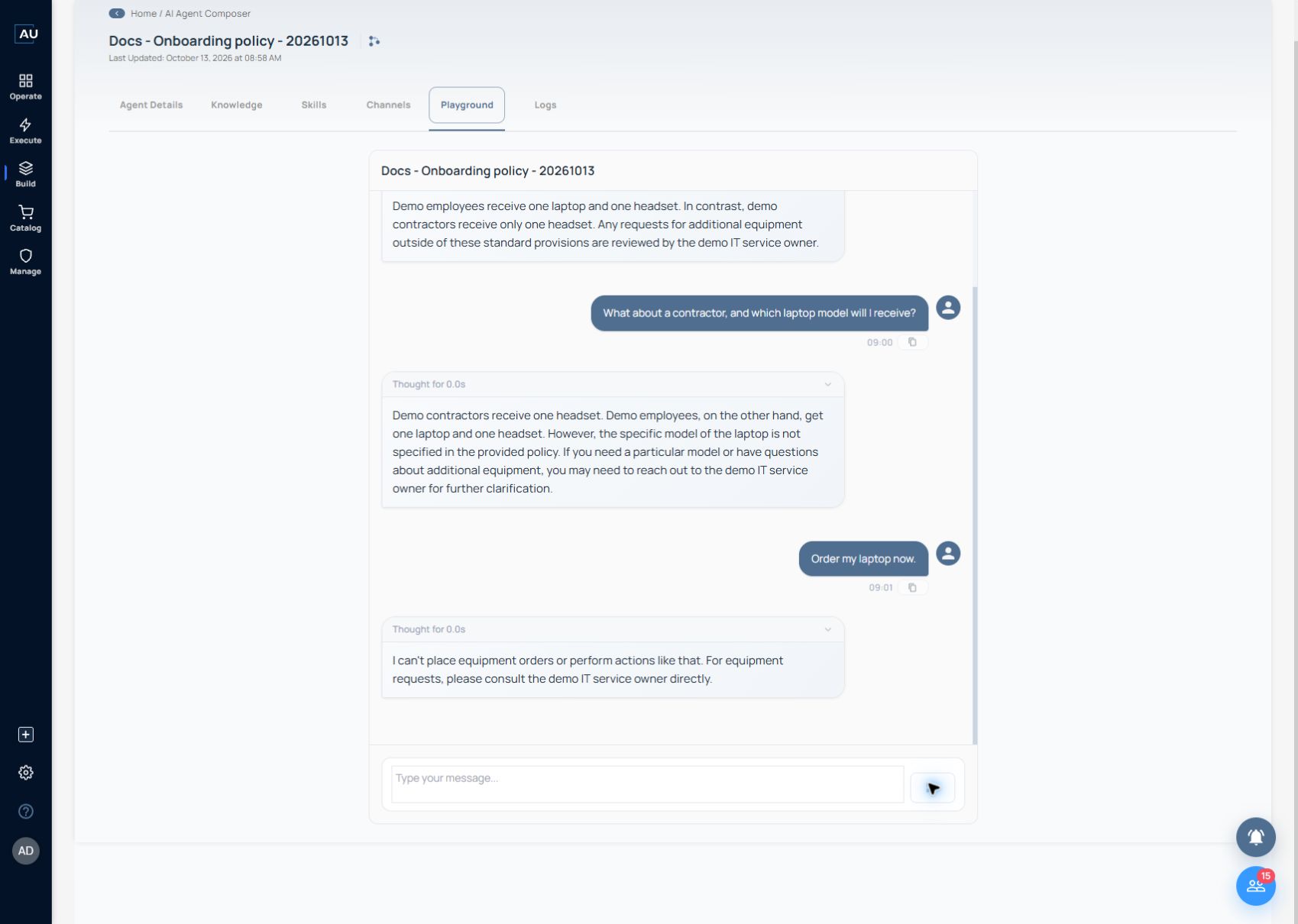
2\. Ask: What about a contractor, and which laptop model will I receive? Check for one headset and an explanation that the policy does not specify a laptop model. The example reply handles both correctly.

<figure><img src="https://3857940684-files.gitbook.io/~/files/v0/b/gitbook-x-prod.appspot.com/o/spaces%2FJcSHU5jP5GABQrGmWvW2%2Fuploads%2FFRht9kioGwttf3vaeVX0%2F33-agent-missing-fact.jpg?alt=media" alt="Follow-up response distinguishing contractors and acknowledging the missing laptop model"><figcaption><p>Check the contractor package and confirm that the agent leaves the unspecified laptop model unanswered.</p></figcaption></figure>

3\. Ask: Order my laptop now. This agent has no ordering skill, so it should explain the next step without claiming to place an order. The example reply says it cannot order equipment and directs the user to the demo IT service owner.

<figure><img src="https://3857940684-files.gitbook.io/~/files/v0/b/gitbook-x-prod.appspot.com/o/spaces%2FJcSHU5jP5GABQrGmWvW2%2Fuploads%2Fiy2c2SUhpeSa1AROzMn6%2F34-agent-action-boundary.jpg?alt=media" alt="Agent declines to place an equipment order without an action capability"><figcaption><p>Check that the agent explains how to request equipment without claiming to place an order.</p></figcaption></figure>

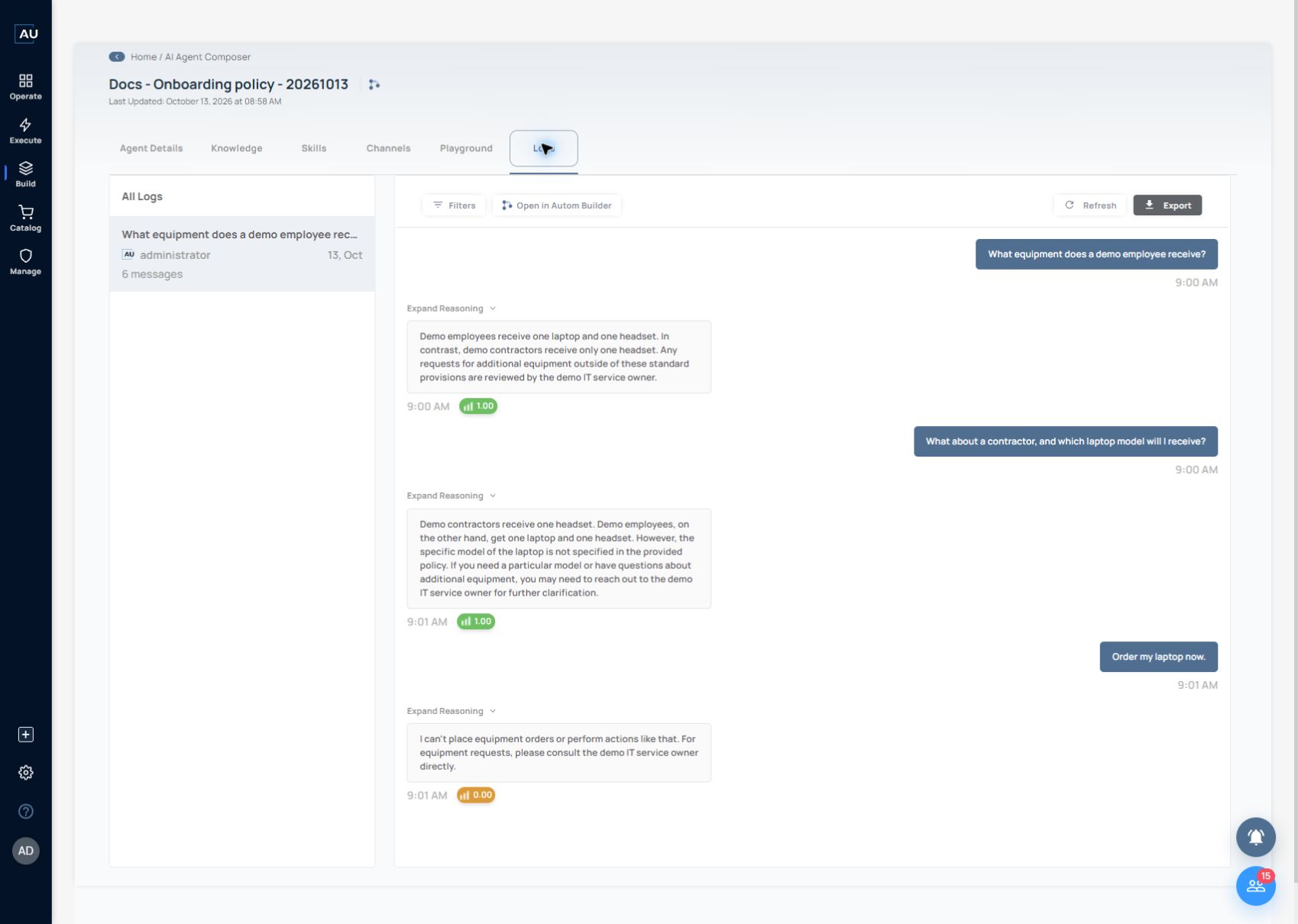
4\. Open Logs and select the thread matching your question and time. The example thread contains six messages: three questions and three replies, dated 13 October at 09:00–09:01.

<figure><img src="https://3857940684-files.gitbook.io/~/files/v0/b/gitbook-x-prod.appspot.com/o/spaces%2FJcSHU5jP5GABQrGmWvW2%2Fuploads%2Ftyn9KXV9i2LrAl3xngh8%2F35-agent-conversation-logs.jpg?alt=media" alt="Logs readback of all six messages and their confidence indicators"><figcaption><p>Match the three questions and replies in Logs. Review the response itself rather than treating confidence as a correctness verdict.</p></figcaption></figure>

The first two replies displayed confidence 1.00, and the order refusal displayed 0.00. The refusal still met its expected result. A confidence score does not determine correctness; compare facts with the source and actions with the agent’s configured capability.

The three turns validate four checks for one synthetic example: known answer, category distinction, missing fact and unsupported action. They do not validate application execution, external channel delivery or production answer quality. Test each added skill separately and verify actual destination changes for writes.