> For the complete documentation index, see [llms.txt](https://docs.autommate.com/userguide/llms.txt). Markdown versions of documentation pages are available by appending `.md` to page URLs; this page is available as [Markdown](https://docs.autommate.com/userguide/ai-agent-composer/add-knowledge-to-an-agent.md).

# Add knowledge to an agent

Use the **Knowledge** tab to give an agent reference material for its answers. Keep the first knowledge set small and relevant to the agent's purpose; add more sources after checking answer quality.

<figure><img src="https://3857940684-files.gitbook.io/~/files/v0/b/gitbook-x-prod.appspot.com/o/spaces%2FJcSHU5jP5GABQrGmWvW2%2Fuploads%2FIexhSCmy3pZSQsXf2dOb%2Fagent-knowledge.jpg?alt=media&amp;token=4fbcc925-28bf-414a-9e09-aebf6e6f5f0e" alt="Knowledge tab with Upload Files, Public Websites, Applications, and Text"><figcaption><p>Choose the source type that holds the information your agent needs.</p></figcaption></figure>

### Choose a source type

The Knowledge tab offers four source types:

| Source type         | Intended use                                           | Example                                                     |
| ------------------- | ------------------------------------------------------ | ----------------------------------------------------------- |
| **Upload Files**    | Add files as knowledge.                                | An approved employee onboarding guide.                      |
| **Public Websites** | Add website links as knowledge.                        | The public support articles relevant to the agent's job.    |
| **Applications**    | Select an available application as a knowledge source. | An approved application source exposed in your environment. |
| **Text**            | Add reference text.                                    | A short, maintained explanation of an internal process.     |

Choose a source for the reference information the agent needs. Adding a knowledge source should not be treated as a model-training setting.

### Add a focused source

1. Open the intended agent and select **Knowledge**.
2. Select the source type that matches the material you want to add.
3. Follow that source's configuration dialog. Use the formats, fields, and permissions shown in your current environment.
4. Review the **All added knowledges** area to confirm the expected source is listed.
5. Open **Playground** and ask a question whose answer you can verify from that source.

Expected result: the source appears in All added knowledges and the agent answers a known question using the correct source information.

Check the selected source dialog for accepted formats, limits, permissions and any processing status. Confirm refresh behavior when using content that changes regularly.

### Test retrieval with known answers

For an onboarding-policy source, an illustrative test set is:

| Test question                                                                  | What to check                                                              |
| ------------------------------------------------------------------------------ | -------------------------------------------------------------------------- |
| “Which equipment should a new starter receive?”                                | The answer agrees with the connected policy.                               |
| “Does this apply to contractors too?”                                          | The agent asks for clarification or uses an explicit policy distinction.   |
| “What is our policy for an overseas office?” when the source does not cover it | The agent identifies the gap instead of inventing a policy.                |
| “I heard the policy changed yesterday. Is that true?”                          | The agent distinguishes its available source from an unverified statement. |

Compare the answer with the approved source. If a citation or source reference is available, check that it supports the answer.

### Keep knowledge and actions separate

Knowledge provides information. A [skill](/userguide/ai-agent-composer/configure-agent-skills.md) provides a configured application capability. Connecting a policy document does not give the agent permission or a tool to create an account, open a request, or update a record.

For example, an agent may explain the onboarding process from knowledge while using a separately configured skill to retrieve the status of an onboarding request. Test each capability independently.

### Maintain the source set

Assign an owner for the content, note which version is approved, and repeat known-answer tests after material changes. If conflicting or obsolete sources are present, resolve the source conflict rather than only changing the prompt.

If No result found appears, check the source list and configuration before testing company-specific answers. Add the required source or tell users which information is unavailable.

### Worked example: a three-sentence onboarding knowledge source

Create a small synthetic source so you can check the answers without connecting an HR system. In Knowledge, choose Text and put Demo onboarding policy in the text itself. This dialog has no separate source-name field.

Sample source: “Demo employees receive one laptop and one headset. Demo contractors receive one headset. Requests for equipment outside these packages are reviewed by the demo IT service owner.”

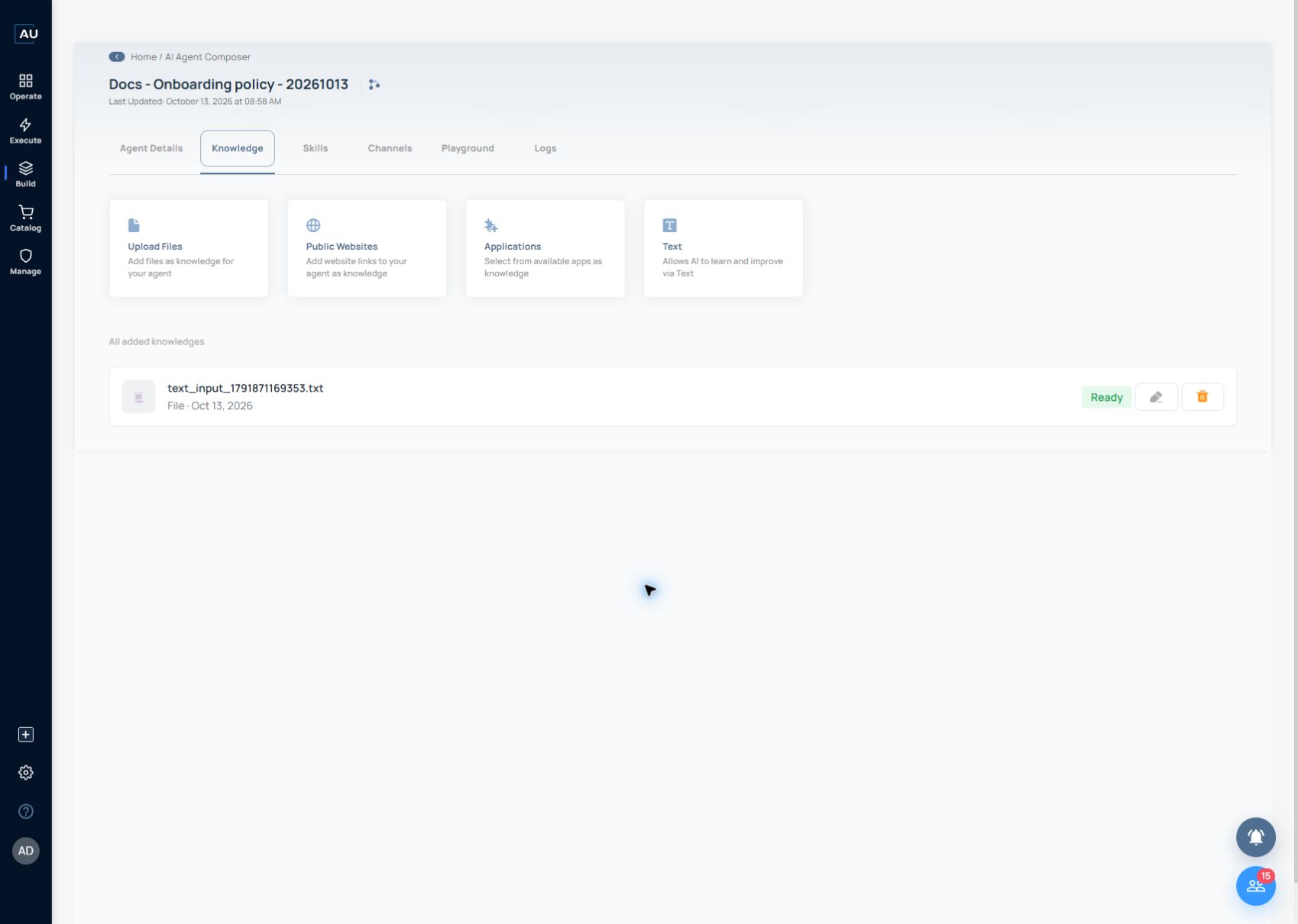
After saving, confirm that the generated .txt source appears in All added knowledges with Ready status. The descriptive title is inside the source content; the list uses a generated filename. Open Playground and use these checks:

Known fact — Ask “What equipment does a demo employee receive?” Expect the answer to contain one laptop and one headset.

Different category — Ask “What does a demo contractor receive?” Expect one headset; the agent should not copy the employee package into the contractor answer.

Missing fact — Ask “Which laptop model will I receive?” The source does not specify a model. Expect the agent to identify the missing information rather than invent one.

Action boundary — Ask “Order my laptop now.” This knowledge source contains no ordering capability. Without a separately configured skill, expect an explanation of the next step, not a claim that an order was placed.

Inspect the conversation in Logs and compare each factual statement with the three source sentences. If the interface shows source references, inspect them too. Once this controlled example works, replace the synthetic text with an approved source and repeat the same known-answer, category and missing-fact tests.

### Try it: add a Text source and wait for Ready

Open Knowledge in your onboarding-policy agent, choose Text and paste the text below into Text Content. The editor displays a 2,000-character limit and has no separate name field. The screenshots show the presales example from 13 October 2026.

Demo onboarding policy. Demo employees receive one laptop and one headset. Demo contractors receive one headset. Requests for equipment outside these packages are reviewed by the demo IT service owner.

<figure><img src="https://3857940684-files.gitbook.io/~/files/v0/b/gitbook-x-prod.appspot.com/o/spaces%2FJcSHU5jP5GABQrGmWvW2%2Fuploads%2FVA77U2Z2L3RwAqpxeZFQ%2F30-agent-knowledge-source.jpg?alt=media" alt="Add Text dialog containing the synthetic onboarding equipment policy"><figcaption><p>Paste the policy into Text Content and choose Finish. Put the descriptive title inside the text.</p></figcaption></figure>

Choose Finish and inspect All added knowledges. The saved source in this example is text\_input\_1791871169353.txt, shown as File with status Ready. Your generated filename will differ.

<figure><img src="https://3857940684-files.gitbook.io/~/files/v0/b/gitbook-x-prod.appspot.com/o/spaces%2FJcSHU5jP5GABQrGmWvW2%2Fuploads%2F2UcSUzjUwcdkDmj6pvC1%2F31-agent-knowledge-ready.jpg?alt=media" alt="Generated onboarding-policy text file listed as Ready"><figcaption><p>Wait for the generated text file to show Ready, then test a known-answer question in Playground.</p></figcaption></figure>

The known-answer test returned one laptop and one headset for employees. The follow-up correctly gave contractors one headset and said the laptop model was not specified. The request to order a laptop was declined with guidance to the demo IT service owner.

Open the Playground guide to see these replies and their matching conversation logs. After the source reaches Ready, run all four answer checks. Repeat them whenever you replace the source or change the prompt.